Showing posts with label clock radio with presets. Show all posts

Denon AVR990 7.1-Channel Multi-Zone Home Theater Receiver with Networking Capability and 1080p HDMI

Denon AVR990 7.1-Channel Multi-Zone Home Theater Receiver with Networking Capability and 1080p HDMI Connectivity
  • All five channels of equal 120-watt power @ 0.05 % THD, 20 - 20kHz
  • HDMI 1.3a Repeating (5 inputs, 1 output) provides one cable connection between the receiver and TV
  • 1080p HDMI connectivity supports Blu-ray disc surround sound formats, including Dolby TrueHD and DD+, dts-HD and dts-HR
  • Dolby Laboratories new Pro Logic IIz Matrix decoding featuring front height effects channels
  • Audyssey MultEQ, Dynamic Volume and Dynamic EQ

I have owned Denon in the past, and have always found it to be quality Audio gear

Now that I need a Home AVR it was to no surprise after taking a 5 or 6 weeks to decide

I went with Denon AVR990 / 3310IC

I wanted to go with Pioneer SC-25 at it was the Model that I was impressed with, and my needs to have Phono Input with an input stage (the amplification part for Phono) would sound great! but I settled for the Denon as I got a better price not sure what the sound difference is, as I did not have a side by side comparison, but I absolutely love the Denon AVR 990 Phono Input stage, with my JVC QL-Y55F with GRADO G-2 Cartridge sounds MUCH better than my CD's that I have the same Copy on both, It is a fun test for when people that come over to see how suspired the Vinyl records sound fuller and richer than CD's also my speakers are also my speakers are Magnepans (full-range ribbon) that helps

Anyway the sound is Amazing, and I am very happy with my purchase, as my Previous model for the last 6 years was Harman Kardon so I wanted to make sure the new model sounded as good or better than my last as you may have noticed, I felt not go back to Harman Kardon not because I did not like sound or quality! The fact is the late models have had Known Issues, I felt better stepping away from that brand for now at least

& Denon & Pioneer certainly fit in that category in my opinion

Key Points for me are as follows:

True HD & DTS-HD Master Audio Decoder

AL24 Processing

7 Channel Discrete Mono Amp Construction

Audyssey Dynamic EQ room acoustic correction system

Onboard HD Radio (even AM)

Network Capability

Compressed Audio Restorer (for when I do stream in lower quality stuff like MP3's)

Now on a negative note: I cannot understand why after using the Very Nice Included Audyssey Dynamic EQ room acoustic correction system I cannot set the Base management for each IE: HD Radio set to -2 or the DVD set to +4 & Phono to Flat?

So yes every time you change the setting in the base management, it goes for all

Please keep in mind I am more about the Music, & given that is the only negative I could think of after owning it now for 4 months, I feel this is a great choice for me.

Buy Denon AVR990 7.1-Channel Multi-Zone Home Theater Receiver with Networking Capability and 1080p HDMI Now

After 1 year of use, 3 different configurations in two completely different rooms, I still absolutely love this receiver. I have the receiver paired with 7 Polk speakers, and I still think this rocks. Take care to use speaker wire of the appropriate AWG for the length of the run for the surround sound speakers (my satellites need 20 ft of wiring to get the wires into less conspicuous locations).

With HD Radio and plenty of local stations using it (and an iPod), I skipped the whole networking thing. Rhapsody and Napster aren't worth it to me.

Pros:

Great sound quality at all volumes

Handles every audio format my Blu-ray and DVR throw at it

Better than average GUI

HD Radio

Attractive remote for most uses

Cons:

Never got the subwoofer setup balanced -with good, full-range speakers (24 Hz low end on my mains), the bass was overwhelming for every configuration I tried. So, I ditched the subwoofer (really!) and became beyond content. The auto setup correctly compensated and put in the "right" amount of bass.

"Late night" compression doesn't really work very well -it's okay, but it still lacks something.

A minor detail, the speaker connections on the back are too closely spaced, imho.

As a note: setting up 7 speakers and 3+ components does involve a significant know-how, so I think the 1-star review didn't know what to expect.

Read Best Reviews of Denon AVR990 7.1-Channel Multi-Zone Home Theater Receiver with Networking Capability and 1080p HDMI Here

The best stereo I have ever owned. The quality is simply amazing. The only drawback is the receiver-based navigation for the iPod dock sucks. But other than that, this really is an incredible receiver.

Want Denon AVR990 7.1-Channel Multi-Zone Home Theater Receiver with Networking Capability and 1080p HDMI Discount?

bought this to replace an Onkyo that didn't have HDMI connectivity and also wanted integrated HD radio. Installation was a breeze with HDMI. Audyssey setup gives amazing balance to my 5.1 audio configuration. The GUI interface much better than the Onkyo and while owners manual could be a little better in explaining advanced settings, Denon customer service was most helpful when needed. TV signal input from HD cable and Pioneer Blu-Ray DVD thru the Denon to Panasonic LED HD flat panel looks amazing. I also have a Panasonic VCR, a Dual turntable and Onkyo 6 disc CD changer connected and all work well with the Denon. HD radio with a rooftop antenna gives strong signal and very clear audio. The Denon has plenty of power to drive the surround sound speaker system and runs much cooler than the Onkyo ( it's enclosed in cabinet with vented back)

Overall I'm very pleased with this unit and definitely would recommend to anyone looking for a mid-priced AV receiver.

Update: I added a NETGEAR WNCE2001 WiFi internet adapter to access internet radio. Works great with my 2Wire DSL home network and easy to set up. Bonus function is the updating of Denon firmware to keep the software in the receiver up to date.

I debated for a long time about buying this receiver; I checked out Denon's website,read all the reviews and a lot of forums. As I am sitting here,I can't think of any good reason for me spending this much money on it. I'm not just speaking of the Denon brand alone : I think that all of the new A/V receivers are pretty much alike. I have an older Pioneer 5.1 channel receiver that has been working flawlessly for over 12 years. My first Pioneer lasted over 20 years and still is perfect today. I could kick myself every day for selling that masterpiece of a 2 channel receiver. I only wanted a new one for the HDMI inputs and a few other options.I would have bought another Pioneer,but the new models don't have phono input or switched outlets to plug in my cooling fans in my custom made cabinet. Most of my use will be for listening to analog sources as I have hundreds of cd's, tapes and LP's. I will also be using it to watch DVD's and a lot of old VHS tapes.(remember those?) My thoughts on the AVR-990 are that it is indeed a handsome receiver with a lot of "bells and whistles" and connections. It is rated at 120 watts x7 @ .05 thd. My Pioneer was 100 watts x 5 but seemed like it had just as much power and a lot more bass output than the Denon. The overall sound of the DENON is quite good; Smooth response and definition and the video upscaling seems to work very well. There are some convienient options that I like,such as individual control of the source inputs and manual equalizer. I do not like the way the volume control responds or the lack of function buttons on the face of the unit. I,like another reviewer stated, was annoyed by the fact that I needed to resort to the confusing manual in order to find out how to make a simple adjustment; You cannot manually tune in radio stations from the face of the unit;This and some other functions can only be done from the remote. My receiver seems to have problems with memory settings and when I did the test-tone for the speakers set-up,the unit started the process with the volume level extremely high. Dangerous to my Polk Rti 12's. I checked the manual,tried several options and it did the same thing every time. Brand new receiver! I called Denon and they suggested a reset but to no avail.They told me to send it to a repair center; nearest one is 200 miles away. I just don't feel like disconnecting everything, boxing it back up and sending it out. Not worth it!! Not worth the cost of shipping or the wait.I am disappointed; This thing cost a lot of money, I was hoping for and expecting more. Upon research,I have found that many of this model have been returned for various reasons. In conclusion; I suggest thinking over the purchase of a new A/V receiver,especially if you already have an older one that still works good. For what you gain does not justify the high cost of a new one. Buy yourself something else. Just my opinion.

Sony ICF-CD855VSIL TV/Weather/FM/AM 4 Band CD Clock Radio

Sony ICF-CD855VSIL TV/Weather/FM/AM 4 Band CD Clock Radio
  • Wake to your favorite CD or radio station
  • Interior decoration conscious stylish design
  • Sophisticated LCD display
  • Clear acrylic lid lets you see the disc spinning
  • Triple display (Present Time, Alarm A / Alarm B)

Bought this for its sleek design, small footprint and CD capability. It was purchased for our babies room so that we could play CDs. We wanted something smaller and better looking than any of the boom boxes and not as expensive as the shelf systems at which we looked.

So your needs may differ if you plan to use this as an alarm clock.

We really like the size and sound quality for something this small. It is very easy to set up without even using the owners manual. The buttons are well placed and have a very solid feel. The unit has a very high quality feel to it as you would expect from Sony and considering the price.

All functions work as described so I won't spend a lot of time on them individually. Reception is excellent in FM mode, AM is a bit weaker. The TV and weather bands are very hit and miss as far as reception and was dissapointed that I could not get better reception from the preselectd weather frequencies as I live in a well populated area that is subject to severe weather.

CD works flawlessly but the size hinders the bass and mid-range a bit. But again, consideing the size of the unit I am more than happy with the sound quality. If sound quality is more important than size you may want to consider the Panasonic RC-CD350.

I have only four complaints about this unit... the wall wart power supply is huge, the LCD backlight is VERY bright, even on its lowest setting of three. This isn't too much of an issue for us as we will use it as a night light in our babies room. More frustrating is the fact that considering how bright the LCD backlight is it is difficult to read the LCD diplay. I couldn't use this if it were for my bedroom alarm clock. And the last is the lack of a battery back up. This is sort of silly in a unit that costs $80.

Bottom line is this is a high quality unit which has a few drawbacks that a unit of this price point shouldn't have.

Pros:

Sleek design (Only Panasonic was close on design)

Relativly small size (considering it plays CDs)

Good sound quality (Panasonic was better but bigger)

Solid feel (What you expect from Sony at this price)

Cons:

Huge wall wart transformer

VERY bright LCD backlight

Poor weather band reception

Difficult to read LCD

No battery back up

Buy Sony ICF-CD855VSIL TV/Weather/FM/AM 4 Band CD Clock Radio Now

I really like this clock radio but Sony needs to fix a couple of items. The sound is great compaired to most of the clock radios I have owned and I like that you can set the two alarms to different stations and audio levels.

Now to the problems. First is the power cube. You can not disconnect it from the radio. I have a headboard with a 2 inch hole for power cords to go through. There is no way that cube is going through that hole! Currently I have the cord running across the headboard and down the side. I will be cutting the cord shortly and then splicing it back together. If you could unplug the cord from the radio this would not be needed. Second is a big one no battery backup of the clock data. I have had two power outages since getting the clock. Both times I had to reset the radio preselects and the alarms. Here is a hint set the radio channels first, you need them set when you do the alarms. Third issue is the light. This clock could be used as a flashlight! For some reason Sony did not cover the back of the display. There was more light coming out of the back of the display than the front. I have a mirror on the headboard so you could almost read by the light. I place a piece of tape over the back of the display and it cut down most of the light.

Overall I am happy with this clock radio. The sound quality and digital tuner are great. It is just the little things that Sony needs to work on, but I would buy it again.

Read Best Reviews of Sony ICF-CD855VSIL TV/Weather/FM/AM 4 Band CD Clock Radio Here

I suffered with this clock for a year because it was a gift and expensive. Even on the lowest setting the blue glow is so bright my finace says it looks like an alien spaceship is landing in the room. The sound is so-so and it has no battery backup, lose power for a second and you have to reset everthing. It is also very big, taking up 1/2 my nightstand. The final straw was that it has trouble tuning in even the strongest radio stations where I live. This morning I finally gave in, accepted reality and tossed it in the trash. I won't miss it at all.

Want Sony ICF-CD855VSIL TV/Weather/FM/AM 4 Band CD Clock Radio Discount?

I was very happy with this clock radio the sound is great, the options for pre-sets are wonderful. However, if the power goes out, you loose EVERYTHING the time, the radio presets and the alarms you've programmed. This is rather annoying & time consuming (as it's a bit complicated to reset these things) and there is no battery back up.

The CD sound from this compact unit is virtually unmatched. CD's sound magnificant. Unfortunately, the backlit display was bright enough to warn overhead air traffic to stay clear of my bedroom. The display is transparent and, as a reuslt, its light shines through the front and the back of the unit. Even on the lowest setting my bedroom was significantly illuminated. Sony should have included a hood to put over the unit at night, or perhaps a black-out mask for your eyes. If you intend to use this in your bedroom, forget it. Otherwise, it would make a great appliance for another room in your house.

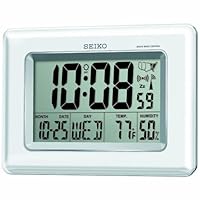
Seiko QHR020WLH Advanced Technology R-Wave Desk Clock

Seiko QHR020WLH Advanced Technology R-Wave Desk ClockClock works like a charm. Seiko is a brand I've trusted for years owning countless of watches. The clock is solidly build and the atomic signal did set the time correctly within 24 hours.

Got this for my 96 year old mother-in-law, she loves it. Easy to set-up and very good looking in any type of decor.

Buy Seiko QHR020WLH Advanced Technology R-Wave Desk Clock Now

Does everything as seen in picture and seems to be very accurate. Has all the functions that I wanted like temp and humidity.

Read Best Reviews of Seiko QHR020WLH Advanced Technology R-Wave Desk Clock Here

Just install batteries, set time zone, push set button and ten minutes later right time and date. Live where we always lose power so this is great to keep right time.

Want Seiko QHR020WLH Advanced Technology R-Wave Desk Clock Discount?

Wave® Music System III with Multi-CD Changer - Titanium Silver

Wave® Music System III with Multi-CD Changer - Titanium Silver
  • Lifelike sound from Bose® waveguide speaker technology
  • Enjoy uninterrupted listening from up to 4 CDs in succession
  • Includes single CD player, additional multi-CD player, improvedadvanced FM/AM tuner, headphone jack, 3.5 mm auxiliary input, remote, clock
  • Now with: Touch-top on/off/snooze controls; dual independent alarms; displayed song/artist radio info

My faithful stereo of nearly 15 years bit the dust and I started looking for something the right size, with a CD changer. My old stereo had a 5 CD changer and this one only holds 4, one in the main unit and three in the add-on changer, but it was the best I could find in a good size. It has some excellent points and some that I don't really like, so research before you buy. First, the issue of clarity/sound. This little guy has great sound and the clarity is mind-boggling, but this is, to my mind, a unit that was first designed for people who listen to classical music and other music styles where the sound of each individual instrument is important. This unit does that incredibly well, especially with earphones. The volume is great unless you're in a gigantic room (and it will still get pretty loud)and the sound, on any type of music, is good. However, if you like rattle-the-windows percussion where the drums are beating your heart for you, this may not be your best choice. I find that the drums sound good, but aren't as prominent as some stereo systems make them and there is no equalizer to tweak it and get it rocking better. Still, for most people it won't be that much of a problem. It also has no buttons to push. Yep, nothing, nada. There's a place to press on top of it (but no button or anything; you just pat it like you would a puppy, very gently) to turn it on or off, but no other place on it to adjust anything. It's all remote control driven. I'll just admit up front that I do not like the remote control. It's a so-called "credit card" remote and yes, it is very thin, but that's part of the problem. It's very thin, absolutely covered with buttons (but no numeral buttons to go straight to a particular song) and there's not any place really to hang onto it without pushing a button. It's hard to hold and that makes it hard to use. Plus, I had to buy a second one since I found that with no buttons on the unit, I was constantly hunting the remote and it was always across the room. I also don't like the way it kicks out a CD. It only puts it out a little way, so you have to take hold of the disk to pull it the rest of the way out. I like to put my finger in the disk center to avoid touching the disk, but you can't do that since it's not far enough out.

All this sounds like I don't like it at all, but really I'm pleased with it overall. I think that Bose should update a little to accomodate the fact that a lot of their listeners now are beginning to be rock and rollers and they like more drum sound. I really think an expensive unit like this should have an equalizer to give some choice about the sound you want, though I admit that with more percussion, they might have to have bigger speakers, which would increase the size and the cost. Still, it's a great unit and so little bitty that it hardly takes any space at all, maybe 15 inches or so wide. Other good points include the incredibly fast set-up (VERY easy) and the CD changer is fairly quiet and fast, compared to most stereos that clang and clunk for a minute or two.

Bottom line, I like the stereo and if it lasts a decent amount of time (which only time will tell) it will be well worth the money. Most of the bad points aren't that bad and the good points are pretty good, so I am pleased, overall.

Buy Wave® Music System III with Multi-CD Changer - Titanium Silver Now

Just received my order but only the Multi-CD Changer arrived instead of the whole Music system set. Moreover, the CD changer box was also opened although the actual shipping carton was intact. So disappointed! BE AWARE though that the main Music System is the newest and latest model (Bose Music System III) . . . BUT . . . the 3-CD Multi-CD Changer is the old original one. I feel that this is a trick. I thought both parts are the latest III versions!

My first Bose purchase was in Dec 2011 (original Music System with original Multi-CD Changer). The CD changer of that set made noise as it changed CDs and so many complained about their CDs getting stuck. Plus that system set completely went dead on me after 2 weeks. All lights were lit, Music system appeared to be responding to the remote control but no sound was coming out at all. I changed the remote battery, changed the remote control itself, connections checked, electrical outlet checked, confirmed that the music system was not on 'mute' . . . but the whole system was still dead silent.

I wouldn't even try to exchange or re-order because many people had complaints about this original 3-CD Multi-CD Changer and for many, the problem occured after the 1-yr warranty and Bose refused to do anything about their cases.

I will (and should have had!) be getting a more reliable music system from a local electronics store.

Read Best Reviews of Wave® Music System III with Multi-CD Changer - Titanium Silver Here

I like how compact the two pieces are wave radio with one CD and multiCD changer with space for 3 CD's. They multl-cd changer fits nicely under the wave radio. Love the Titanium Silver color very unobtrusive. Had to connect antennae in order to get all stations (you have to buy the antennae).

I love Jazz and classical music. The Wave radio has one CD and the multi-cd changer holds 3 CD's. Music plays all day, changing from one CD to another. Can change CD's by using remote control 'eject' button (have the larger remote that lights up, love it for clarity of seeing and using all options).

One negative when changing from one CD to another, you hear a light clattering noise; you would think Bose would come up with a quiet changer, but not yet. The music sounds beautiful but doesn't fill several rooms; it fills a couple open rooms, such as family room opening up to a living/dining room. I asked if there were wireless speakers available so I could hear the music throughout the home, but was told there are no wireless speakers that would connect to this system.

I like the Bose system very much wish there were wireless speakers to pull the music throughout the entire home.

Want Wave® Music System III with Multi-CD Changer - Titanium Silver Discount?

After setting up and operating a few days, one of the CDs stuck and would not eject.

I had to push another CD into the slot to reposition the stuck CD. It then ejected OK.

Since then it's been working satisfactorily.

This is a great sound system. Visited the Bose Showroom about a year ago and loved the sound. Wasn't ready to purchase at that time. Sounds just as good in our home. The best!!

LG Optimus Slider Prepaid Android Phone (Virgin Mobile) VMM701LGKIT156

LG Optimus Slider Prepaid Android Phone VMM701LGKIT156I recently switched from Sprint to Virgin Mobile. At first, I bought a used Blackberry 8530. It was a terrible phone and it stopped communicating with Virgin Mobile within a week. On the hunt for a new phone, I heard about the Optimus V. It kinda reminded me of the Hero in it's look and capabilities, and coming from an EVO 4G with Sprint, that really didn't seem like enough.

That's when I found the Optimus Slider. The Slider has an 800mhz processor, which I feared would still be too slow, but was actually very snappy. Without the bloatware UI you find on HTC phones, this phone despite not being as powerful as my Evo, actually is faster in the menus. I used to get lag all the time with my Evo, and so far nothing with this (and this is while running live wallpapers and alternate launchers like Go Launcher).

The phone plays all the apps well that I had stored on my Android account, and works flawlessly with Amazon's app store. This was a huge plus for me, as when I rooted my Nook Color I had all sorts of problems running many applications. Everything on this however works flawlessly.

The keyboard's buttons are huge, and feel much easier to type on than other slide out keyboards. I never mess up while typing now, and never use the on screen keyboard. The red accents on the keys give it a very nice "droid" look, and the included Home/Menu/Back/Search buttons on the keyboard are a nice touch.

The camera is pretty ho hum. 3.2 Megapixels and no flash. It records video, which is a plus, but only has a rear facing camera. Overall, it's much worse than my Evo, but then again, my Evo's cameras weren't good enough to take high quality photos in either. I usually use my stand-alone camera for good photos, so on the go quick snapshots work just fine for what it is.. a phone.

The slider is quite smooth. In fact it's better quality than my old Playstation GO's slider, which violently snapped into place. This is much smoother and doesn't wobble like my GO's slider once fully pulled out.

All in all, this is my first LG phone, and I have to say, I'm very impressed. For what I paid (168 free shipping) with no contract, it really highlights how much other carriers are over-charging for their phones (most of which are 5-600 out of contract!). It was nice to be able to replace my Blackberry without waiting for a contract to expire. I simply went out and bought a new one at the same price everyone else pays. The 3G is just as fast as the 3G on Sprint, so for 35 out the door for unlimited data and texts, it's a no brainer. I'm very happy I finally left Sprint, and I'm very happy with this phone.

If you are still suffering with an Intercept, this is the phone for you! Although the specs say the screen is the same size, the Slider screen is higher resolution and slightly larger. Physically it is a little flatter and wider and it feels like a much more upscale device. There is virtually no lag in the UI, versus the tens of seconds on the Intercept. Physical Android keys mean positive feedback that you pressed one.

Games like Angry Birds and Nano Panda run great. Music output is clean, and videos play smoothly. Photos and videos are also an improvement over the Intercept.

The Android 2.3 dialer interface is MUCH improved over the one in 2.2 on the Intercept and you'll find yourself using fewer keystrokes and accidentally hanging up or re-dialing a lot less often. Recommend Mintues Checker for Virgin Mobile from the Market to keep track of how many minutes you have left. Skype also works almost okay over the 3G data connection, but there is enough distortion that touch tones don't work. Skype over WiFi is great with a headset, and toll free calls in the US are free on Skype (e.g. conference bridge numbers) and of course don't use any of your Virgin Mobile minutes.

Google turn by turn navigation with GPS and satellite images is there, although you have to download a voice synthesis app from the Market before you get voice prompts (it tells you which one to download).

Voice dialing is supported, but I highly recommend Choice Dialer+ Free for this phone, as you get confirmation of names before it calls unlike the native Google dialer that will happily start to call your ex-girlfriend or the San Diego Zoo when you asked it to call your Mom.

On the downside, battery life isn't as good as an Intercept. While actively fiddling it is surprising how fast it burns through battery. With JuiceDefender and ATK I CAN make it through a business day with about 40% power left. Red lettering on the keyboard is difficult to read in low light and numbers require pressing the Fn key. It also seems slow to charge (takes well over an hour). Also Flash is not supported on this device, but there is a YouTube app. Lack of a light sensor means you sometimes have to manually adjust brightness to avoid being blinded, or to read outside.

Like the Optimus V you can enable the hidden WiFi Hotspot function, but unfortunately on this device it still doesn't work. PDANet on the Market does work fine.

If you are making an hour or two of calls a day and check email SMS very 30 mins or so this phone should work out great for you. If you are on an Intercept, this is a no brainer upgrade for you.

UPDATE since this phone came out Boost Mobile has made available the Transform Ultra, which is a much more powerful phone than this with more internal memory. If looking at unlimited plans, I think going to Boost for the Transform Ultra makes a lot of sense as it starts at $50 and with shrinkage gets down to $35 over 18 months. You CAN port from Virgin Mobile to Boost.

Buy LG Optimus Slider Prepaid Android Phone (Virgin Mobile) VMM701LGKIT156 Now

I have owned the LG Optimus Slider (VM701) phone nearly a month. My spouse and I were able to take advantage of a Radio Shack special for Christmas 2011 that made this a far better buy. I can't complain about Virgin Mobile's service. We had to call customer service a couple times during and after activation and the reps were always friendly and we were not disconnected. That being said, I would advise that you activate your phone online. I called in my activation but had to go online before it "took". It took me about four hours for the phone to activate using my existing cell number but nearly two days and several phone calls for my spouse. (There is an "activation status" link on the Virgin Mobile website.)

As a first-time Android owner it is fun to explore the Android marketplace, where it is possible to download a number of apps directly to the handset. You name it, there's an app for that. That's the good news. Now for the bad: with 181MB internal memory -not the 512MB indicated in Amazon's description -the VM701 fills up very fast when running apps that must utilize or reside on that space. Here's what we learned: All apps, even apps that can move to the included 2 gigabyte micro SD card, require some of that internal memory to operate. To write text messages or the like, you must always have internal memory free or errors and freezes will occur. I loaded enough apps at one point to come within 14MB of the internal memory limit only to encounter a severe memory outage. My phone froze and I had to reset the battery five times in a row before I caught a tiny status message on boot-up indicating that memory had run out. Consequently, if I had to name one bad thing about this mobile phone it is that you will run into memory limitations very quickly if you go "app happy" like I did. Some apps, like wallpapers and themes, insist on running on internal memory and you will have to make decisions about what takes priority. I recommend a minimum of 20MB free of internal memory at all times to avoid crashes and hangs.

I am not sure if it is the phone or the Gingerbread OS but this phone sometimes has a mind of its own. I set a custom ring tone for my spouse and after two weeks it decided to switch to the Virgin Mobile start-up tone. A check of the settings revealed that my custom ring tone was still in place and that my preferred ringtone for general calls had changed on its own. When my spouse calls I get the "generic" ring tone instead. The other thing that has caused a fair amount of frustration is that the ringer mutes upon boot-up, yet only intermittently so. I like to turn my phone completely off at night and if I don't remember to check the volume button on the side of the phone when switching it on the next morning I will find it on "silent" later in the day even though I did not enter the operating system settings to mute it. I still haven't ruled out if an app is causing the issue, which is possible because my spouse has the same phone and has not had this particular problem.

Above and beyond anything else I *assumed* about this phone, my spouse and I expected that like our feature phones the LG Optimus Slider would support audible (spoken) caller ID. This is not to be confused with the visual caller ID where you see your contact's picture and phone number pop up on the scree when the phone rings -this form of caller ID is built in and functions flawlessly. Rather, we are attempting to enable an overlay such that when the phone rings it reads aloud what is shown on the screen. Thus far, I have paid for several apps and downloaded all the free apps on the market for "voice announce" caller ID and it does not reliably work -even for callers who are in our contact lists. Once in a great while it will surprise us by correctly stating who is calling but for the most part our phones ring as normal or, if the SVOX voice says anything at all, it is to identify all incoming calls as "unknown". In searching various Android websites, I learned that audible caller ID is supposed to be a stock menu option in the Gingerbread OS but for whatever reason LG and/or VM has altered the menu so that it is omitted or hidden. If VM customer service has fallen short on one measure, it is in the conflicting responses I received to this question. Nobody can tell me whether it is a carrier vs. a hardware limitation, and the PDF owner's guide I downloaded didn't address the subject either. A post to the LG forum didn't clear up the issue, and attempts to use LG's web email form failed as did the Virgin Mobile website support form, neither of which have been working recently. It may have been VM's decision to strip this option out of the settings menu in attempt to streamline the OS to run on the phone's limited memory but that doesn't explain why I can't get a stand-alone app to fill in for the missing function.

The best thing I can say about this handset is that it is solid in feel and will allow you to experience Android smartphone functionality for a low monthly prepaid price. The worst thing I can say about this handset is that reception, coming from AT&T and Verizon, isn't up to par. It's not clear whether the network is to blame or the phone itself is lacking for an adequate antenna. All we know is that calls commonly clip or cut out when one of us is inside a mall or big-box retail store (though not at home or in the car, typically). Still, it is to the point where my spouse has left a store to complete a conversation outside. LG voice quality is good and the in-call volume is adequate when reception is good. Whether reception is adequate in the first place is the wild card, however. This phone utilizes the SPRINT network and here in SoCal that network ought to be as good as any. Unfortunately, we have noticed that sometimes our phones can be side-by-side and one of us will get the 3G signal (green bars and indicator) and the other will get white bars and 3G symbol, which if I am not mistaken signifies a slower 2G data connection. Odder still, we were driving beneath a SPRINT tower one day where we had five bars and on the other side of the street behind a small fast food restaurant all data connectivity dropped temporarily. If I had to evaluate VM as a carrier for business use -and if I do recall the TOS for VM the company actually forbids commercial use so this may be a moot point -I would recommend against Virgin Mobile and its parent company, SPRINT. However, if your primary aim is to own a modern smartphone while saving more money than you can with any other provider at present for unlimited data and texting, this prepaid LG smartphone is a great value. The VM voicemail system is better than AT&T's because it will time-stamp messages but on the downside I had to download a "missed call" app to get a tone to alert me to a missed text or voicemail message. That is because the phone's built-in notification consists solely of a tiny icon on the status bar and an equally tiny LED light that glows green when the phone has completed charging and/or an unheard or unread message has arrived. Both are far too discrete and easy to miss, but fortunately there was an app to solve the problem.

A lot of LG Optimus Slider owners have complained about battery life, whereas a PC Magazine website article describes it as "excellent". I wouldn't call it excellent but it has not been as bad as I expected, either. My spouse typically needs to recharge half way or so through the day, whereas I can get through an entire day without a recharge even with frequent use (for me that is WI-FI more than talk or text, thus far). The phone is rated for 4.5 hours of talk time but when fully charged an app I downloaded, "Easy Task Killer", indicates that I have six hours of talk time. I have not talked on the phone for more than an hour continuously, however, so I don't know how accurate that is. In any event, we each use an application, available on the Android market, to conserve battery life. My spouse uses the free "Easy Battery Saver" app and I paid for "Juice Defender Plus" to compare the differences. What we learned is that some of the optimization settings to eliminate drains on the battery can also disrupt WI-FI and data connectivity. We at first thought our phones were faulty because we downloaded a battery-saving app first thing, only to find that the phones would drop WI-FI at random sitting five feet from the router, or after going out and about the data connection would not surrender so that the handset could seamlessly pick up in-home WI-FI. We set our phones to use a static IP address and that helped moderately with the WI-FI issue. However, I highly recommend Juice Defender Plus because not only will it keep the battery going it has a "mobile data" force-on feature and WI-FI fix. Once I went to the application settings and checked those fixes I have had no further problem with random drops when switching between the VM data network and WI-FI. All this aside, if you have particularly bad battery performance it may be a defective phone or battery. If, on the other hand, you are a heavy user the solution may be to seek out a compatible aftermarket battery that is rated in excess of the stock OEM battery rating of 1500mA. Please be advised, however, that the use of a third-party battery may void your handset warranty.

With respect to the slide-out keyboard, I am glad we opted for the LG Optimus Slider over the Optimus V, which differs chiefly in that it omits a physical keyboard. The Slider's QUERTY keyboard is much faster. In contrast, I find that the Swype keyboard is too narrow due to the limitations of the screen size, and therefore I am prone to making more mistakes on the virtual keyboard than its physical counterpart. That being said, I have been frustrated in that there appears to be some way of accidentally triggering a copy/cut/paste function. I still haven't quite figured out why but if there is something in my clipboard and I hit the letter "v" the content is either pasted in over what I am currently composing or lost, depending on the action I have accidentally triggered. I attempted to post this how-to question to the Virgin Mobile product page Q&A for this handset but VM never posted it.

The web via Android is generally accessible but not to be compared with the experience of a conventional Internet browser/computer connection. This mobile phone, other than the built-in YouTube app, does NOT support Adobe Flash (contrary to Amazon's description). Whether for this or some other reason, some websites that permit comments don't allow for successful login, nor the ability to submit comments using the built-in Google Android browser. Alternatives such as Dolphin, Opera or Skyfire mobile phone browsers are not much better in this particular regard. I have spent a fair bit of time retyping things that I lost because the cursor is missing from the comment field or the clipboard content I had intended to paste is pushed out by accidentally triggering the "copy" function while attempting to get a cursor to move or a "submit" button to work. As expected, there are some websites that are optimized for mobile viewing and others that are not. It takes good eyesight to make use of non-optimized websites. Normal newspaper print type is 9 points whereas the type on a conventional (non-mobile) web page, when viewed on this phone, hovers around 5 points. You can zoom in with the flick of two fingers but that, in turn, means that the text doesn't always wrap correctly for easy reading. I can understand why a lot of people who own these smartphones also end up buying a tablet. Fortunately, the LG Optimus Slider screen features crisp resolution and the brightness options are adequate for all but the most glaring outdoor conditions. The only downside in this regard is that the brightness adjustment is a manual one. This handset does not come equipped with a light sensor to automatically adjust screen brightness but you can always install a toggle switch on your home screen for instant access to this setting, if need be.

The 800Mhz processor seems fast enough for most tasks. The phone bogs down a bit when multiple apps are going but game-play in Angry Birds, for reference, is smooth with few "force quit" issues. Internet radio via Pandora and iHeart Radio work well. Oddly enough, however, it took some doing to get the VM Live app to buffer the carrier's own streaming content. To my pleasant surprise, I also found an app that will allow iTunes to sync with my phone, and sound quality through the mono speaker or stereo headphone connection is quite good. On the flip side, it is puzzling why some apps insist on running even when you don't want or need them. Using the free and highly functional "Android Assistant" to perform backups and to browse the phone's internal file structure, one of the system processes that runs frequently in the background is the built-in Facebook app. This is both creepy and inexplicable given that I choose not to join Facebook and have no need to operate it. (Unfortunately, it ships with the phone and can't be deleted to free up space.)

This handset is Bluetooth compatible and provides turn-by-turn GPS navigation functions, but I have comparatively less experience with these other than to say Bluetooth, GPS and data usage hasten battery drain. For GPS use I recommend a car charger, sold separately. As for the 3.2MP camera, I must admit that I was disappointed with image quality. Shutter lag is significant, which results in soft, unattractive pictures under artificial indoor light. There is no flash but the camera works better than my first impression led me to anticipate under natural light or sunlight with pleasing color accuracy. There is not a front-facing camera for video conferencing but that was not a high priority for me in the first place -one camera is enough for the price. Last but not least, it is my understanding that the LG Optimus Slider will NOT receive the Ice Cream Sandwich (ICS) OS update because the internal memory and/or processor speed is inadequate to support it.

All in all I am happy with the purchase of the LG Optimus Slider. The stars I have docked are for poor indoor reception foremost, and secondarily for the operational glitches that seemingly give this handset a mind of its own.

Read Best Reviews of LG Optimus Slider Prepaid Android Phone (Virgin Mobile) VMM701LGKIT156 Here

Not sure why currently the shipment time is 5-8 weeks on Amazon, but I picked this up today from Best Buy (begrudgingly). The phone is basically the older Optimus V, which I currently have, with a faster processor (800Mhz vs 600Mhz I could tell a big difference when using the operating system, it's much snappier now), more internal memory (512MB vs 256MB), a physical keyboard, and Anroid 2.3 (vs 2.2). It's really a nice phone that you can tell is made well the fit and finish is really nice. The keyboard slider works well too it's a very smooth action that just feels right. My only complaint for this phone is that it has a fairly small screen of 3.2". It's just a little on the small side for browsing webpages and such. Also, now that I think about it, I wish the camera had a flash for it. I do highly recommend this phone though if you're looking to switch to Virgin Mobile or to upgrade your Optimus V or Intercept.

Want LG Optimus Slider Prepaid Android Phone (Virgin Mobile) VMM701LGKIT156 Discount?

I bought this phone as a replacement for the LG Optimus V (already from Virgin Mobile) and I really like it.

A few things that I noticed:

GPS is much faster, and is actually usable in real time with navigation (I had issues with the previous phone)

Keyboard is really nice to use, slide really smoothly and I actually find the 4 Android buttons on the left pretty useful

Android 2.3 Gingerbread provides a really nice touch to this phone, and is much faster than 2.2, download management, application and power management are some of the new nice features of 2.3

Last but not least, the memory!!! twice as much as the Optimus V, this is really the main reason I bought this phone. It was really annoying to have to delete most applications just to install a new one that cannot be moved to the sd card. Because they are a couple like maps which take a lot of space and that you cannot move. Really frustrating...

The main downside is the battery life which is still not much better than the previous Optimus V

I just want to clarify that I bought this phone on cyber Monday for 99$ at Virgin Mobile. So not that much for a nice upgrade!

Anyway, I think this is the best phone from Virgin Mobile so far

Save 42% Off

Humvee Self-Powered Dynamo Wind-Up AM/FM Radio with Alarm Clock & Compass

Humvee Self-Powered Dynamo Wind-Up AM/FM Radio with Alarm Clock & Compass
  • Digital Alarm Clock AM/FM Radio
  • Dependable Emergency Light.
  • Self-Powered Dynamo Wind-Up. Retractable Handle.
  • Compass. Flashlight.
  • 6V DC Plug.

This is a great little gadget with such big functions. I would recommend this to anyone who cares about taking care of themselves and their families in times of emergency type situations. The alarm is very loud, the radio works great and the light and compass...well, you never know when you may need them. Small enough to pack and the hand crank makes it a life saver if your batteries become a no/go. I'm telling all of my friends about this little guy. You never know when you will be hit with an emergency that leaves you in the dark without communications.

Georgene, TX

Buy Humvee Self-Powered Dynamo Wind-Up AM/FM Radio with Alarm Clock & Compass Now

After just one week the radio just stopped working all of a sudden even though the flashlight, clock and emergency siren continued to work. So I shipped it back for a refund a week ago and I'm still waiting to be refunded for the purchase price. Will update my review for better or worse when I receive the refund or not.

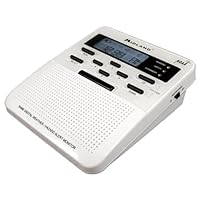
Midland WR-100C Weather / All Hazards / Civil Emergency Alert Monitor with S.A.M.E.

Midland WR-100C Weather / All Hazards / Civil Emergency Alert Monitor with S.A.M.E.
  • Receives All NOAA Weather Channels
  • S.A.M.E. Technology
  • Memory System for 25 Counties
  • Clock with Alarm
  • User Selectable Warning , Siren, Voice or Flashing LED

In retrospect, I wish I had ordered the WR-300, as the WR-100 does not have an AM/FM tuner. When you're hiding out in your bathroom during severe weather (and my WR-100 is located in my master bathroom for convenience), it would be nice to be able to listen to your local radio stations for bulletins. Still, this radio performed flawlessly just a few hours after I opened it up. It woke me up at 1am to tell me there was a tornado watch in my area, and I turned on The Weather Channel and confirmed this.

The manual comes with a set of instructions on how to get the radio up and running. DO NOT SKIP THESE! You should not assume that you know how to use this product intuitively, because it is not a very intuitive product at first. It will become extremely easy to use later, but only AFTER following the instructions in the manual to the letter. SAME codes for your region can be found at http://www.nws.noaa.gov/nwr/indexnw.htm#sametable

I bought this radio even though it had a few bad reviews, because I was pretty sure that some of the bad reviews were just operator error. My radio runs just fine plugged into household current, and will run for several days on the 3 backup AA batteries. Keep a pack of spare AA batteries around, because this radio is a real lifesaver and you don't want it to run dry during a power failure.

Two reasons I gave this radio 4 stars instead of 5:

1. No AM/FM radio. If you need that, get the WR-300.

2. When the weather radio switch on the right side is set to "on", every keypress will react with a very loud BEEP! If you use this radio as an alarm clock in a quiet bedroom, you must first turn that switch to "off" and then the unit will operate silently while you adjust your alarm time or activate the backlight to check the time. This is a small nuisance and I wish it had been designed differently. Don't forget to turn that switch back "on" when you're done, or the radio won't sound an alarm in case of an emergency.

Buy Midland WR-100C Weather / All Hazards / Civil Emergency Alert Monitor with S.A.M.E. Now

Note: this is a copy of a review that I posted for the WR-100B, which appears to be nearly the same (check both listings for best price).

I live in Oregon, which is not noted for severe storms, but I was really caught "off guard" last week when a severe thunderstorm with a large amount of hail blew through. Severe weather can occur almost anywhere! Shortly after the storm, I ordered one of these weather alert radios to keep me more aware of any local hazard that could pose a threat.

The radio itself is quite sensitive, and provides reception of several more distant weather stations that can not be picked up by less sensitive receivers such as the general purpose (AM/FM/TV/Wx) Sony 410 (see my review of the Sony).

The big deal here is the weather alert function... The radio can be set to be silent until it receives a specially coded message from the NOAA weather station. The radio can be programmed to respond to "codes" from one area or several, so you can adjust your "zone of protection" to suit your needs. When a warning that affects the area that you have programmed in (by setting specific SAME codes) is detected, a loud alarm or flashing light or voice alert will sound (your choice).

If it is desired to hear a weather report, just push the "weather" button on the unit and listen... very much like those old Radio Shack "weather cubes" that were very popular 20 years ago, but with better reception.

Everyone should have one (or more) of these.

Read Best Reviews of Midland WR-100C Weather / All Hazards / Civil Emergency Alert Monitor with S.A.M.E. Here

This product works perfect...and was a great price especially with the rebate....To the person with the problem making the unit run on DC power....you had it plugged into the wrong jack on the back...NOT the middle jack...Plug DC cord into jack labeled DC....and then it will run fine on household current and not eat your batteries.

Want Midland WR-100C Weather / All Hazards / Civil Emergency Alert Monitor with S.A.M.E. Discount?

This radio is superb. It is easy to setup, and functions very well in our area. It has more options for user selection than any other similar device I've used. No home should be without one.

Save 26% Off

This unit was actually delivered to me Thursday and we had our first severe weather of this season on Sunday, four days later.

This radio allows you to listen to weather forecasts at any time want to by pressing one button (when you first get the radio choose one of seven frequencies for which you get the best reception.)

The best part of this radio is the "S.A.M.E." technology which only sounds alarms for severe weather in the in the county where you live. You can choose to have alarms sounds for multiple counties area your area refer if you prefer.

Because the National weather service station in my area covers such a large area, severe weather watches and warnings are very common. The "S.A.M.E" Technology allows the radio to sound the alarm only when severe weather threatens the county in which I live.

The radio is easy to program and the user's manual answered any questions I had.