 Hello and thank you for reading this review.
I am a phone app developer and have had some 'face time' with the Nokia N97. I'll let you know some of the more in depth details so you can decide if this is the right phone for you or not. There are many positive features about this phone, but a few potential pitfalls for power users as well. Average users will probably never notice any of the pitfalls, but probably will never use some of the best features of this phone either to justify the cost.
This is the new Nokia flagship phone and it packs almost every feature anyone could ever want. It has a DVD quality camcorder with sample videos found here:
http://www.vimeo.com/4352001
Notice how well the mic picks up the creeks of the boats in Monte Carlo, and how rich the colors look. That is due to the Carl Zeiss lens Nokia has put in. The quality is also great and can be sent directly to the TV via the TV out cable, but I would recommend making a DVD from the memory card as the quality of the cable isn't as good as the DVD quality this phone provides. Video starts up quickly, which is an improvement from the previous versions.
The pictures taken by this phone are of very good quality. Many consumers are fooled by 'megapixels' (mp). Well folks, after 5mp or so, mp doesn't mean much. All it does is make your picture size better, it does NOT increase the QUALITY. I assume most of us aren't pro graphic artists that need huge pictures to zoom in on the most minute detail, and if you are, then you probably don't need this review :P
The lens and picture quality of this phone is superb, but not as good as the Samsung 8 sadly. It is by far tho, one of the best mobile phone cameras around. You can notice some problems in darker areas and they went with a dual LED flash instead of the Xeon gas flash. The Xeon gas flash would have provided much better lighting in low light situations, however as a phone enthusiast I feel it's good enough.
View sample images from thesymbianblog.com:
http://vaibhavsharma.wordpress.com/files/2009/05/nokia-n97-camera-photo-sample-01.jpg
and
http://vaibhavsharma.wordpress.com/files/2009/05/nokia-n97-camera-photo-sample-03.jpg
Judge for yourself.
This phone is a TRUE smart phone OS which means you can download apps for it such as VPN software to connect to your office network and apps such as PUTTY or RDP clients to remote control real computers at the house/office. With 3G speeds the potential is limitless.
Now for the bad. Nokia decided to use the old ARM II CPU found in the N85, 95, etc. phones but increased the clockspeed (mhz) slightly. We were looking forward to the new TI cpu which would have provided much better speeds, at the cost of battery life. They also stuck with 128mb ram with about 80mb available after boot up. I don't know about you but after I load up all of my apps and get cranking, I eat that up. I was able to notice some slow down in the pre-build when I:
-opened up several websites w/ flash content
-ran the music player
-opened up 'widget' applications
-tried basic functionality
Most users will probably never do that. If you are a power user, then you probably already know about the Samsung Omnia HD which boasts of similer features, but also the new faster CPU and dedicated GFX chip which means you can play Ipod type 3d games with ease. The final point is with the potentially underpowered CPU, you will not be able to play the super high resolution videos the Samsung can play.
Finally this phone has the slower 3G speeds which don't reach 7mbps, will you need 7mbps? Probably not. I think for 99% of users, the current 3G speeds offered by this phone are fine.
I tried out the phone and pre-ordered, I can't wait to get it. I can't wait to develop some 'widget' applications for it and really see the power of this phone with the newer more stable build.
Thank you for reading this, feel free to respond, yell, scream, or ask any questions!

Nokia Eand N-series phones have for some years now had, by far, more capabilities than anything else out there but they have not always been the sexiest or had the widest mass appeal. Plus, although Nokia sell more smartphones than anyone else worldwide, they have not targeted or marketed the US market very heavily (thanks in part to our combination of non-standard wireless technologies and frequencies, consumers' focus on style over substance, and Nokia's unwillingness to cater to the fairly heavy-handed branding and crippling of functionality demanded by US network providers).
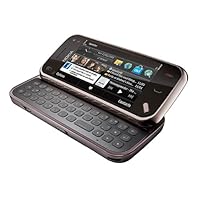
Much of that is changing with the N97. As you can see it definitely has the visual appeal. Also, its main enhancements over the most recent N-series phones (such as the N95, N96 and N85) are user interface centric:
>> 640x360 WVGA LCD
>> Touch screen
>> QWERTY keypad
>> Faster CPU (ARM11 at 420 MHz vs. 332/369 MHz in the N95/N85, and two ARM9 cores at 265 MHz in the N96)
>> Configurable widgets for the home screen
There are a couple of other improvements as well:
>> 32GB of built-in storage, µSDHC card slot for up to 32GB more (Nokia always advertise only the tested configuration, 16GB)
>> Additional sensors: Magnometer (electronic compass), Proximity
So, yes, Nokia have finally bit the dust and moved onto the post-iPhone touch screen bandwagon. But whereas Apple borrowed quite a few UI elements from the Motorola Ming, and other manufacturers in turn tried to copy the iPhone look and feel, Nokia has taken a decidely different approach: They have taken most of their new design elements from their own Internet Tablets line (e.g. exchangable home screen widgets, keypad layout, etc). They have also done so while keeping the underlying OS from their previous smartphones, Symbian/S60.
I don't care much for this direction. To this day, I would take the E90 any day over the N97, had it been released with support for North American 3G (UMTS) bands. The E90 does not have a touch screen, but does have a numeric keypad on the outside in addition to the QWERTY inside the shell -this allows you to "type" with one hand using the native T9 predictive input, and mostly keep your eyes elsewhere while dri... eh... walking.
As it is, Nokia ended up with touch screen phones (starting with the 5800 XpressMusic) kicking and screaming it kindof shows. The user interaction paradigm is a little odd at times -probably mostly due to the S60 legacy. [Lipstick/pig joke deliberately omitted here]. For instance:
>> You need to double-tap on icons (once to select, once to open)
>> They still retain "soft keys" on the side to access menus an the like (though now they are located on the display itself, and occupying quite a bit of space). The home (previously "standby") screen has three soft keys; the left and middle are always "Options" and a a dial pad, while the right one is configurable ("Contacts") by default.
There are some other usability issues with this phone as well:
>> Copy & Paste functionality is a bit more cumbersome. There are no keypad shortcuts; with the keypad open, cut/copy/paste are only available via the menus! Moreover, not all text input screens have such a menu available in which case you need to close they keypad in order to bring up a virtual numeric keypad with a context menu at the top of the screen. Or, if you use an external Bluetooth keyboard, you can press Ctrl-X/C/V.
>> The keypad layout is a little unusual at first. The navigation keys are on the left (which some gamers like, but I don't). The space bar is in an odd location on the right. Mixed alpha/numeric input is cumbersome because the digits 0-9 are "shifted" via a key on the right side of the keyboard, while the standard shift key is on the left. Plus, in some dialogs you get a helpful numeric keypad on your screen, but it defaults to text input (2=abc, 3=def, etc) rather than give you quicker access to digits! (Why, Nokia? You already have the keyboard? What are you thinking?). That said, the tactile feedback is good, not too "firm" or "clicky", but with a good feedback.
>> There is a nice E-mail status widget for the home screen, but you can only have one of these. If you have multiple e-mail accounts (e.g. for work/home), you can only monitor one of them. The same goes for some of the other widgets too.
>> Direct media controls are gone (the N95/N96/N85 had a dual slider design giving ready access to play/pause/previous/next). There is a home screen widget available, but it is hardly as convenient (e.g. if you are using an application, typing a mail, etc).
Some other limitations that I found so far when compared to their previous N-series phones:
>> The amount of available RAM (dynamic memory) available for applications is low (around 55MB, versus about 75MB in the N85/N95). UPDATE 2009-07-01: This may not be an issue after all. With the latest firmware update from Nokia, the available memory seems to have increased to about 65MB and in general, the only time I have had a "out of memory" error was while running RoadSync, which explicitly warns that it is not compatible with this phone.
>> Adobe Reader is no longer included in the price of the phone. It is still preinstalled, but now only on a trial basis. If you want to continue using it after some days (about 3 weeks I gather), you need to purchase it similar to QuickOffice.
>> The number of applications available for this phone is somewhat more limited; this is only the second Nokia phone to use the new S60 5th edition user interface w/touch-screen support. Although most of the older applications will still run on it, there may be some that don't. Notably, Nokia Internet Radio is not included, nor is it available for download yet. :(
>> Synchronization of phone contacts/events/todos is not yet supported on the Mac, as Nokia have not as of the time of this writing released an iSync plugin for it. (You can still synchronize with Microsoft Exchange, use the built-in "Switch" application to copy contacts from another Nokia phone, or you can transfer contacts as vCards from another phone).
>> Getting Bluetooth Stereo Audio (A2DP/AVRCP) to work with your Bluetooth car stereo is hit and miss. More on my experiences in this regard in the "white" model review.
>> The UI is generally a bit "sluggish" moreso than my previous phone, the Nokia N85, despite a faster processor. The touch UI probably has a lot to do with this. (Then again, both the N95 and certainly the N96 did not break any speed records by any stretch of the imagination).
All that said, most of these issues are software/firmware related, and will improve over time. As it is, the N97 is perhaps the most capable phone on the planet today -a jack of all trades, if you will. It certainly has improved over previous N-Series phones in a number of ways as well:
>> E-mail reading is dramatically improved especially in clients with HTML support (e.g. System SEVEN). Also, because most of these integrate into the "Messaging" application, messages are listed much more nicely in the mailbox -the larger screen is used very well here.
>> Web browsing what a pleasure. This was the main attraction of the iPhone but I think the N97 surpasses it. Kinetic scrolling, variable zoom, and quite a speed improvement. Of course the previous strengths are there too the way the "Back" button brings up snapshot views of your previously viewed pages, Flash, etc.
>> The phone has quite a "solid" feel to it, without feeling like a tank.
To be sure, there are phones out there with better cameras (e.g. Samsung Pixon), more newbie-friendly user interfaces (iPhone), better support for a variety of corporate e-mail standards (Blackberry), and so on but hardly any that have the combination of all these features in one device. The closest may be the close cousin Samsung Omnia HD, which:
>> runs the same OS, has the same screen resolution and many other features
>> has a better camera (yeah "megapixel blur" but also optics), HD video recording
>> faster CPU (600 MHz vs 420 MHz)
but:
>> does not have good support for U.S. 3G frequencies, and
>> does not have a keypad (QWERTY or otherwise).
These two shortcomings pretty much kills the Omnia HD as an alternative for me.
Also, aside from the N85, the N97 is the first Nokia phone to support tri-band UMTS ("worldwide" 3G). This means that you will get 3G speeds (mostly) where they are available: 850/1900 MHz for AT&T Wireless and other carriers in the Americas, 2100 MHz elsewhere (including Japan). That said, for complete worldwide coverage you would need "penta-band" UMTS, with the additional inclusion of 900 MHz for Europe, and 1700 MHz for T-Mobile USA. No phones currently support all of these bands. NOTE: There is also a "standard" version of the N97 for international markets, with support for 900/2100 MHz internationally and 1900 MHz for roaming in the Americas.
You probably won't see this phone subsidized on contract by a carrier anytime soon. The primary candidate would be AT&T but it looks like they have passed on it (perhaps they don't believe it has mass market appeal). Then again, if you are looking to get this phone, you are not likely to be the type of person who would accept their lockdowns in the first place. Look no further than the differences between the unlocked Nokia E71 versus AT&T's E71x for a prime example: In AT&T's version, various features are disabled (keyboard shortcuts for copy&paste, the S60 native e-mail reader, network selection), and instead a number of non-removable, non-renamable, non-movable AT&T specific applications are installed.
Another upside of buying an unlocked phone like this is that it may cost you less in the long run. It seems I'm unable to get actual numbers past Amazon's editors here (see comments) but if you have a standard SIM from AT&T, you can plug it into this phone and add a standard "data unlimited" feature. In contrast, if you get a smartphone on contract from AT&T, your data plan will be at least twice as expensive which adds up over the 2-year contract term to cover (at least) the price difference between most of these and the unlocked N97. Plus, you would of course not need to renew your contract with an unlocked phone like this. AT&T's generally subsidize their phones a couple of hundred bucks versus the unlocked equivalent (except the iPhone, where the subsidy is closer to four hundred, but where the more expensive data plan is mandatory).
Finally, if you take your unlocked phone with you abroad, you can walk into a store and get a pre-paid SIM -that way you local tariffs, rather than pay (outrageous!) roaming fees to AT&T.
Now for a couple of practical aspects and caveats:
>> If you are looking for a unique look, go for the white model, not this black one. Some also think it is better looking.
>>If you are going to use the N97 in your car, to play music or for GPS turn-by-turn directions, do yourself a favor and get a cradle/mount for it. For instance, there is a Brodit cradle (available from ProClipUSA) specifically designed for it; this is one part of a two-part mount, the second part will be specific to your vehicle; you can get one from either ProClipUSA, PanaVise, or Pro-Fit International they are all compatible. Or, if you want a universal holder, the Bracketron Grip-IT works nicely for the N97, and can also be put on the same vehicle specific mounts.
Finally, if you are looking to get this phone, it is important that you get it for the capabilities, not ease of use. Like other Symbian/S60 phones, getting used to it takes a little persistence and discovery, but it will grow on you over time as you explore it and learn more about its esoteric features.When I first learned of the n97's release, I was excited. I had been waiting for Nokia to release another ground-breaking phone, like the n95 of years ago. The n96 wasn't it, nor was the n85. Then the n97 came with a touchscreen and QWERTY keyboard to boot! I was sold at once, but did all of my research anyway and found it to be full of innovative ideas and modern must-haves. I bought it nearly two weeks ago at a reasonable discount from NokiasUSA after Amazon ran out of stock and jacked up the price.
**If you read the specs, you will find all of the high points, but here are some more:
-I found the phone to be fast and responsive when given input. The keyboard is phenomenal the key spacing and feel is just right and the offset space bar is not as big of a deal as it is often made out to be. The only thing I could ask for is a little click to acknowledge the button was pushed, though if the sound is on, the phone makes a small noise. The keyboard could have been even bigger yet if they dropped the D-Pad, which I rarely find myself using as it is a touchscreen (maybe make it a secondary feature for other keys?).
-The GPS unit quickly finds a satellite signal (faster than most Tom-Toms) and accurately places you on a detailed map. The turn-by-turn voice directions work well, except they do not read the street name. Best of all, it doesn't make you agree to do-not-drive-as-you-use-this-device waivers every time the program launches.
-The call quality is excellent.
-No contract and not bogged down with un-deletable carrier apps and tacky logos that remind you who bought your soul.
**The bad and the ugly:
-My first thought when I handled it was, "a little chintzy, eh?" It does give off the impression for a little while, primarily because of the battery cover. They used a plastic, snap-on/ pry-off cover whose snaps are easily bent out of shape, but did not break and easily bent back. The rest of the construction, especially the hinge, seems to be very solid now that I have used it extensively.
-The 5MP camera takes remarkable photos and videos, unless you want to use the flash, which is too close to the lens and whites out a third of the image. Thinking about this more, I decided Nokia has used a very similar camera since September of 2006 when the first n95 debuted and such a quirk is unacceptable in something that has been around the technology world for so long.
-The battery life is terrible. With normal use, it will most likely get 24-36 hours.
-Reception is bad. The internal antenna does not pickup signal where my Blackberry does and my Samsung smartphone (4 years ago) before it did, to include my apartment in Boston (not exactly East Reeve, Wisconsin).
-The FM transmitter is hardly worth having. After trying numerous stations I know to be unused in my area, the reception in my newer Audi with rear-mounted antenna was terrible unless I held the phone out the sunroof. I assume if you have a hood mounted antenna, it would be a little better (does anyone know?). UPDATE (4 July) In two different cars with front mounted antennas and my home stereo the FM transmitter has still proved worthless. You can hear the music, but it comes through with more static than its worth.
-The resistive touchscreen is outdated and somewhat unresponsive. Resistive touchscreens are great if you wear gloves, and if they are huge, but that doesn't happen on a mobile phone. Resistive touchscreens use a grid-like system to figure out where they've been touched, as they have invisible lines that make a grid across the screen. When the selected area is touched, the corresponding up/down and left/right lines are pushed against sensors on the screen's edge and send the information to the processor. Capacitive screens measure minute differences in its electric field cause by the conductive human body and are generally much more accurate.
-The inertia scrolling is not as one would expect, probably because of the aforementioned screen. It does not matter how fast the screen is flicked, the information displayed travels the same measly distance and stops rather quickly no matter what, if it works at all. Navigating web pages is probably the only reason I would use the provided D-Pad just because the scrolling with the touchscreen is so terrible. UPDATE (4 July) The inertia scrolling is not as terrible as I first said, but does vary with applications and takes some getting used to.
-The accelerometer, which detects the direction the phone is tilted, is often incorrect and the phone is very slow to change the screen's display between portrait and landscape.
-Oftentimes, the phone must be unlocked 2 or 3 times to get the LCD's backlight to turn on. This may be a software or a hardware malfunction, I do not know.
-The talk and end button are not raised but should be, especially because the phone does not acknowledge them having been pressed for a second after. Plus, real buttons are always preferred.
**Then there's the software:
-The user interface is not so good. Every application has an options menu, but after the application has been customized, you probably will not find much need for any of the other options except exit, which is buried at the bottom of the menu and needs to be scrolled to.
-The phone screen is inefficiently laid out. On the screen there is a "Call" and "End" button, both of which are physical keys on the phone itself, as well as a "Contacts" button which can be found on the previous screen. I would rather just see bigger numbers. Also, the phone is setup to display two lines of numbers and forces a single number from the area code on on the second line when I would rather like to see bigger number buttons and ALL US numbers on a single line.
-The homescreen widgets do not update as freely as one might like, the AccuWeather is rarely connected and my Hotmail account will ONLY refresh manually, even with full service. The FaceBook app is good.
-The homescreen has a button on it to change the sound profile, but tapping the power button brings up the same menu Nokia should just get rid of the redundancy and dedicate the space to, well, uhhh, anything else.
-No QWERTY keyboard option on the touchscreen.
-Being able to run multiple apps is great, but switching between them shouldn't mean a fight with the options menu, there should be an external button to switch between them. UPDATE (4 July) After further messing around, I found one can hold down the Main Menu button, the silver button to the left of the flat Talk / End buttons, for two seconds to bring up a menu with all open apps.
-The homescreen has an option to compose a new message, but not one to read old messages. The button should be dedicated to going into the messenger application instead.
-Half of the menus require a double touch while the other half require a single touch.
-Plus a dozen smaller "Oh, that's silly" features not worth mentioning.
-My phone has needed to be reset because one or more different things were not working correctly at least once a day, though it has never frozen completely. Once, strangely, the touchscreen would highlight the selected app/item, but fail to execute the command completely.
--UPDATE (4 July)
-One can hold down the Talk flat key for two seconds to activate voice commands which can do anything from call a contact to open an app. This is very slow and often incorrect and cannot be customized to one's voice. Once activated, there is a bar that runs for about six seconds, far longer than any command would take to say, and then takes a little while to process, before bringing back a series of possible matches. If you don't say anything else, it will automatically select the first option after another short duration. I could navigate manually to almost anywhere twice before the voice command finds the desired function, if it finds it at all. On the upside, users can customize what they want to say to the voice commands by typing (not speaking) the desired input to find some combination the phone can more easily recognize, though this is tedious and annoying.
-When paused and exited from, the music play can remain on the homescreen with the Launch, Previous, Play, and Next options available.
-The native video player has a very limited number of playable file types and I have not found a third party video player that works for the n97 yet.
--END UPDATE (4 July)
--UPDATE (23 July)
I might be getting nit-picky with these software anomalies, forgive me, but I expect more from a $700 phone.
The battery life, with average use, averages 48 hours now. I think eliminating the default AccuWeather widget from the homescreen helped out as it was constantly updating and crashing (and never that accurate).
The new software update has been out for almost three weeks. It is an improvement and has fixed the backlight problem, amongst others, though not compeltely. Oftentimes, there is still a lengthy delay between unlocking the phone and the backlight turning on (2-4 seconds). Additionally, closing the screen will occasionally exit whatever program is running at the time. I notice this most frequently with the built in web browser and Nokia Sports Tracker. The GPS reception can be quick as lightning sometimes, but others it will not find a signal for an eternity.
Compared to Opera Mini, the standard web browser is slow. Unfortunately, Opera Mini is quirky when dealing with the touchscreen. When it works, the SportsTracker is an excellent program, though Nokia has taken the n97 / 5800 version off their web page and it must be found through a third party.
When the contacts menu is used to find someone to call or message, a new app is opened to perform the calling or messaging, thus when a second call or message is attempted to be made by navigating through contacts, the contacts menu opens as it was left with the last person dialed still highlighted on the screen.
The symbol button is downright annoying. It accesses a list of symbols, most of which are already on the keyboard as secondary or tertiary options, and is located right next to the space bar and is hit frequently on accident. I would rather just see a bigger space bar than a useless key (at least I have never used it).
--END UPDATE (23 July)
--UPDATE (06 OCTOBER)
I've gotten used to a lot of the quirks, though I'm still not entirely happy with them. The single most annoying feature is the inconsistency when turning the screen on half of the time a message appears saying the key lock must be turned off when that is the only key I've pressed. It takes 3-5 seconds to go away, crippling anyone's intimate desire to use their ridiculously expensive phone on command.
The phone's battery life seems to be much longer in Europe. I can go on a three day weekend, using the GPS, phone, and music features in moderation, without a charge. Maybe the European system is more efficient?
--END UPDATE (06 OCTOBER)
Overall, it is a good phone, but certainly not worth the money. I recommend you wait for the first (SECOND) major software update to be released and reviewed before purchasing.After installing the battery and turning on the device:
As an illuminated white screen became adorned with those blue branding letters, the friendly handshake, and the ubiquitous Nokia jingle, I could only think of immediately setting up a Bluetooth partnership with my MacBook. All seemed to work perfectly as I keyed in location, date, and time information, and then it appeared...the home screen and its grouping of widgets. When the AT&T network secured its grip on the SIM inside and brought the 3.5G reception signal to life, my index finger proceeded to explore the interface. I kept a word document to record my initial experiences with the N97.
-Bluetooth setup
Bluetooth partnership setup with my MacBook Aluminum was flawless. Network access (a.k.a. Tethering) appears to be possible, so I will test this later with my bluetooth connection.
Update: Tethering the N97 network connection via Bluetooth was just as efficient as the E71.
-Missing Sync for Symbian
Had absolutely no trouble downloading Missing Sync for Symbian to the N97. I figured it logical that if the XpressMusic 5800 running S60 5th edition was supported, then another device with the same OS should work just fine. All of my PIM data of contacts, calendar events, and tasks synched successfully to my N97 with no problem. Even the contact photos synced properly! Bluetooth proximity syncing worked perfectly whenever my MacBook was turned on with the N97 nearby, but there was an error message with a stop sign graphic that appeared after each sync session: "Unable to execute file for security reasons". After about a second this pop-up disappeared and all was well, so it did not bring any inconvenience. I can only assume it stemmed from this model not being officially supported by the Missing Sync app. Overall, I am very pleased to see that this crucial application continues to be supported through the newest NSeries device.
-Stereo speakers
While it was nice to have stereo speakers from the mono variant of the E71, their volume was not impressive in comparison to what I remembered from owning the N95. They were certainly not bad and did give a suitable audio playback experience. Ring tones and alerts had no problem in being heard throughout the day amidst public surroundings. The speakerphone was acceptable in volume and a bit louder than the E71.
-Music player
There was nothing special about the music player other than its widget for the home screen and the enlarged album art for the Now Playing screen. An unexpected surprise was the absence of visual art effects that I remembered from the N95 and E75. There was a FM transmitter included with the N97 that was simple to configure with my car stereo, but my use of this would be an extreme rarity due to my iPods.
-Contact Search
Searching for a particular contact was interesting with a new type of searching that reminded me of the SureType technology from the BlackBerry Pearl. When the text field was touched, blocks of alphabetic characters applicable to the first letters of all contacts filled the screen. When a letter was selected, all blocks were then narrowed down to only the characters that could be second to that first selection. As each of these blocks was touched, the contact list itself was also narrowed down appropriately to the possible matches.
-Camera
The 5 megapixel Carl Zeiss lens was very nice for stills and video. I was amazed at the 16:9 widescreen ratio for the captured video footage as well as the included video light feature. Playback of the MPEG4 formatted file on my Mac happened in a default widescreen view in the Quicktime player and showed acceptable results via the 30 frames per second with suitable sound recording. The image mode for the still pictures appeared to not support widescreen in any way. One nice touch was the live preview window for setting color tones and selecting a white balance feature.
-Portability
The sizing of the N97 was similar to my E71 and iPod Touch and I had no problems carrying it in my pocket despite its thicker dimensions.
-Reception/Call quality
Signal strength was no different than my E71, but I did run into a situation with the first few calls I made on the device. A friend of mine on a voice call noticed a faint hissing noise in the background on his end, but I didn't hear any of it. While it could have been my friend's iPhone, it was also clear that the only plausible fault in this situation was the N97 since every previous call with the E71 had been trouble-free. Since then, every call thereafter was clear and normal just like the E71.
-Nokia Email client
Difficulties certainly came with the downloaded Nokia Messaging app for email access. I was not surprised to see that the enhanced email client of Messaging was not preloaded to the N97 since it's main purpose is multimedia. However, some software issues from this particular app irritated me.
First off, I did learn that SMS Provisioning is the message to watch out for when the Nokia Email .sis file is already downloaded to the handset. Whenever I had a link sent to my device via text message from the Nokia Messaging site, I would always click on that link and be forwarded to email setup for the native S60 app. I used to repeatedly get frustrated and wonder why the other client setup was not being initiated. Upon searching Google, I read that there are two messages sent to the device from the Nokia Messaging site. Of these two messages, the first one was to essentially be ignored and the second (SMS Provisioning) would pop-up automatically on-screen. This discovery made every future installation of the Nokia Messaging app much easier.
However, I guess that I was not out of the woods just yet. After a couple hours of diligent email message updating, the touch response on the app was gone...completely gone! No matter how many times I would exit and reopen, the listing of incoming emails would not respond to either finger or stylus input. After almost a half hour of seething, I deleted the application from my N97 and proceeded to resume email access with the native S60 messaging client. While much more reliable, it was ungodly clunky and lacked the well designed interface of Nokia Messaging. I soon quit this alternative to make another attempt to use my previous email access.
Everything worked fine with the installation process, but there was trouble with the login for my mailbox password. There were no spelling errors and I was certain that no caps lock or number lock was activated, but the login error kept popping up nonetheless! After about a half hour wait, I was able to log on successfully and the Nokia Messaging app worked perfectly ever since.
One thing that did catch me off guard was opening attachments. On the E71, attachment links were usually shown under the email address information at the top of the email entry. This didn't appear to be the case with the N97, for even though an attachment was listed at the top of an email under the sender's name, it was not a clickable link. I eventually discovered a "Details" tab above the entire email. When this tab was tapped, it expanded to display all of the sending details of the message (Subject title, time and date of sending, "TO:" field) along with a clickable link.
When an email is received from a N97 contact with a stored picture, the same picture will appear in the upper left corner of the message.
The only con for this email client was that it appeared to work independently of the other native S60 apps such as Notes, Active Notes, Photo Browser, etc. Whenever I tried to send a photo or note via email directly from an alternate app, the N97 would always want to send it via the built-in messaging application instead of the downloaded app from the Nokia Messaging site. Since I did not have my Gmail coming through that older client, there of course was the prompt to set up a new mailbox. Nokia Messaging's lack of integration with the other onboard Nokia apps is somewhat distressing, especially when the Facebook widget has flawless integration!!
Update for 6/27/09
I deleted the Nokia Messaging application from my N97 again. Even though there were alerts played aloud with incoming emails, I could not access the inbox via the widget that had completely blacked out. A couple attempts of deleting the email widget and reinstalling it produced no results whatsoever. Being that the Nokia Messaging app for Symbian 5th edition did not support HTML and was not fully integrated with the rest of the apps on the device, I decided to resume with the native S60 client for email. This is truly unfortunate for a flagship device that was supposed to have so much potential.
-Google Maps
This maps application is just as perfect as the version on the E71, but is made even better through a bigger screen with touch navigation. Installation was no problem via the S60 web browser.
-Battery Life/noise malfunction
I noticed that some touch inputs on the screen did not generate haptic feedback. Every now and then a faint, high-pitched whistle-like sound would emanate briefly...very strange. While I wanted to associate this with low battery levels, this same lack of haptic vibration also took place when the battery was fully charged.
Speaking of battery life, the N97 was certainly not the E71 and barely lasted for one day on a full charge. This got even worse when a bluetooth headset was used for voice calls in addition to music listening. One morning after having used the GPS-intensive Nokia Sport Tracker for an hour with the music player, I took a voice call that lasted for 2 and a half hours and used my bluetooth headset. Upon hanging up the phone, it immediately died from low battery levels. Not once did I ever have this kind of experience on a previous Nokia device...not once! It was certainly a must to have an auto charger handy and be diligent in charging this device EVERY night.
-Notification light
The notification breathing light worked in two successive pulses when it was alerted, whereas the E71 worked in rapid pulses equally spaced apart. To my surprise, it appeared to only work for missed calls, voicemails, and SMS alerts. Unlike the E71, there was no integration with the Nokia Messaging app for email. Even after a new email alert was sounded from the device, the notification light just pulsed in standby mode as if nothing had happened. The rim around the menu key seems to be thinner than the select key on the E71, so the light isn't as noticeable unless surroundings are darkened.
Update: Since I had switched to the native S60 client for future email retrieval, the notification light worked accordingly for incoming mail.
-Gravity application for Twitter
This was the one and only reason that convinced me to restore my Twitter account after a TWO-month hiatus! It runs just as smoothly as the online video and is integrated perfectly with TwitPic! The scrolling of Tweets and navigation of sections emulates the iPhone in such an impressive manner that I had to pinch myself.
Update: I started experiencing a frozen timeline on my Twitter account where I could see only my own tweets, but none of my friends. Even though this was no fault of the N97, I had not been using Gravity as much anymore.
-Nokia Sports Tracker
This application remained as one of the most impressive I had ever come across in a smartphone. Starting from where the E71 left off, the Symbian 5th edition version was much more useful with the enlarged touch screen in navigating training data and route maps for my daily 5 mile runs. Setting up my Nokia account and uploading my fitness results to the Nokia Sport Tracker site proved to be just as easy as the E71, but with a touch screen. I was actually taken aback one day when my iPod Touch had completely froze in the middle of my run, rendering my Nike Sport tracker useless. But all was not lost, for the Nokia Sport Tracker continued recording my running progress. To make things even better via a godsend of a 3.5mm headphone jack, I was able to switch my Sony headphones to the N97 and hear music via the player!! For the first time, I could actually see the Nokia Sport Tracker as more than just an alternate to the Nike Sport Kit.
-Ovi Store
I was simply FLOORED with the flawless experience I had when I purchased the Gravity application from the Ovi Store! No lagging in the browsing of applications and games was experienced at all, and entering my payment information was very easy and convenient.
-Software Updates
One night after having a voice call conversation on the N97, there was a prompt that asked if I wanted to allow the phone to check for any software updates. Out of curiosity, I selected "yes" and watched as the device opened the Software Update app. Even though no update was available at the time, it was nice to get the impression that the N97 was considerate enough to at least ask!
Update: I read online from two tech blogs that Nokia was planning to release a firmware update on July 1st. I hoped that this could be efficiently obtained via an over-the-air download and address nagging issues with my N97 such as the unpredictable backlight. Unfortunately, after numerous checks throughout the day on July 1st, no firmware update was available for download.
-Potential Cons:
1. The qwerty keypad layout is not bad at all with the space bar being shifted to the right. Honestly, I found the space bar to be in a great position for my right thumb in the midst of typing messages. However, the tactile feedback of the keys was extremely minimal, and they certainly did not offer comfort for prolonged typing of emails and potential word documents. The flattened surface area of each key was almost as bad as the E75, but it at least had some raised texture to enable touch typing (if at all possible). I could understand that I was a definite minority when it came to using my smartphone as a word processor, and it was apparent to me that the N97 qwerty was not meant for such writing.
2. There were certain moments when the touch response would not register accurately. While these were few and far in between with menu navigation and application performance, there was one incident when the screen appeared to freeze. Just when I considered taking out the battery, every single touch input began to register and resulted in multiple apps and windows opening simultaneously.
3. I had already become used to the screen backlight of my N97 not working properly. Whenever the device was in standby for an extended period of time and I pressed the lock switch to activate it, the backlight remained off even though I could plainly see the home screen widgets. This was always fixed by pressing the lock switch two more times. This should not have been tolerable for the amount that was paid, but I was willing to overlook that quirk. I guess that that only proved my allegiance to Nokia and what I was willing to tolerate from a so-called flagship device. Honestly, going through the hassle of dealing with returning the phone for a replacement was not worth it for such a minor setback.
4. I had a mishap with the N97 from an incoming voice call during the playback of a movie file. As the phone rang and vibrated, the movie went out of sight as expected and the telephone screen with a contact picture became visible with touch commands to accept or reject the call. When I pressed on the touch command to accept the call, an error message appeared: "Request rejected". Long after about a minute when a voicemail symbol had appeared at the top of the screen, the phone continued to ring and vibrate with the same telephone screen. Opening the qwerty only placed the screen into horizontal orientation, and pressing any of the hardware buttons (qwerty, menu, camera key, and hold switch) had no effect either. The only thing that worked was holding down the power key to turn off the device. Upon turning on the phone, I noticed that the AccuWeather widget was still stuck in a loading data stage after almost fifteen minutes. This was solved when I removed the widget and reinstalled it again onto the home screen. A sudden malfunction such as this reminded me of Windows Mobile, and I was not happy about it. I truly began to miss my E71 at this moment.
5. The Facebook widget had its unpredictable moments. Often there would be a glitch where the home screen was still visible through the area for the soft keys on the right of the screen. Simply exiting the widget and reopening it did solve that problem, but provided a minor irritation. When a photo was taken with the N97 camera, it was usually saved in the Mass Storage of 32GB where it could then be accessed via Facebook's upload utility. This worked successfully for the first few photos I had taken on the Carl Zeiss camera, but then after while none of the new pictures would show up in the Facebook app for uploading even though they had been taken AND saved into the Mass Storage drive! The only way to successfully upload a N97 picture from the Facebook widget is to activate the camera via the uploading feature, making this a huge inconvenience! At one point, there was a glitch where only the function key characters worked for inputting text into the status update field. This was rectified by removing the widget altogether from the home screen and then reinstalling it again.
6. The lack of an editing version for Quickoffice really bothered me when I was informed of it from an article on AllAboutSymbian.com, but I decided to give the N97 a try anyway. I missed my E71 all the more without being able to edit or create word documents. Whenever an attempt was made to buy a license, a screen appeared with the words "no data" since an update was not available. To make the situation even worse, it was version 4 that was bundled with the N97. This meant that there was absolutely NO support for Office 2007 file formats! At this point, even Windows Mobile started to look good. I knew that I was in the minority when it came to using my phone as a word processor, but this issue certainly was not exemplary of a flagship device!
I thought I found a solution in downloading the trial version of MobiSystems OfficeSuite 5 for Symbian 5th edition, but I was somewhat wrong. True, this application did grant me editing of word documents on my N97 along with Office 2007 support, but the typing performance was simply lousy. Characters registering on the screen as I typed on the qwerty proved to be painfully slow and reminded me of the Sony Ericsson P990. Taking steps to save a word document were a bit confusing and not straightforward like on Quickoffice. Overall, I was not convinced that purchasing a license for this app would be the best alternative. If I happened to hold on to the N97, waiting for Quickoffice to release an editing version update would be the best thing to do.
7. I didn't think that the low RAM would have much of an effect on my usage, but it certainly did. While my daily routine of writing messages, managing calls, surfing the web and listening to music were hardly affected, the playback of video content was a different story. Depending on how many apps (and maybe even which apps) were already running, I would get a memory error pop-up on the screen advising me to close some applications. While I didn't have a problem in closing some apps, this did seem to be an inconvenience for something that was claimed to be a flagship device. On the other hand, I was aware of the low amount of RAM before purchasing this N97, so in a way this was to be expected.
8. There was one frightening moment after the N97 had run out of battery power in the middle of a voice call and I had connected it to the AC charger. After about an hour of charging, I disconnected the charger and attempted to unlock it by moving the lock switch. There was no response from the screen, but I assumed that it was the backlight malfunctioning as usual and moved the lock switch again. There was still no response after moving the switch, but the keyguard alert did illuminate the screen when the following buttons were pressed: menu key, call key, camera shutter key, volume rocker keys, and power key. I was also surprised to notice that holding down the power key did not turn off the N97, and opening the qwerty did not change the screen to landscape orientation...the backlight STILL did not come on! I had no choice but to remove the battery and return it in order to bring the N97 back to normal. This brought me to the next con.
9. Taking off the battery door was no trouble, but it almost seemed too easy in comparison to the E71. I watched an online video for a drop test of the N97 and was not shocked to see the battery door popping off. Removing the battery was impossible without an outstretched paper clip to pry it out! On my first try to pull it out, I learned the hard way when my nail was bent backward! There may be an easier way for taking out the battery, but I have yet to discover it at this point.
10. The N97 could be enabled in mass storage mode when connected to my MacBook via the USB cable. It was at this moment when the disk images for both the 32GB N97 storage and the 16GB microSD card appeared on the Mac desktop. Sometimes the disk images would not appear on the Mac screen, but simply turning off the phone and turning it on again solved this.
11. Gaming seemed to be a worthwhile venture when I saw a listing for the Hero of Sparta game in the Ovi Store, so I purchased it with the expectation that it would be like the iPod Touch. I was wrong. It was probably unwise for me to assume that the N97 version would equal that of the iPod Touch, but I couldn't help but do just that. The experience on that particular game reminded me of the 2D graphics of Street Fighter on Super Nintendo, and I was leary of buying another game from that point on.
It had been a while since I unboxed the new N97 and welcomed it into my home with open arms, and I had a conflict. No matter how great the device happened to be with multimedia content, I always seemed to have a yearning for the word document editing ability and the tactile qwerty feedback of my previous E71. Aside from the quirks that came with any touch UI, those two factors were the only things that caused me to sometimes doubt my N97's usefulness. For a moment, I even began to debate whether I was better suited for the ESeries instead of the NSeries. It was quite obvious that the N97 ran circles around the E71 in regards to certain multimedia features, and I questioned if it was enough for me as a phone user. Through the irritation of not having an editing version of Quickoffice and enduring a failed attempt with MobiSystems OfficeSuite, I started to justify a return to the E71 and its familiar qwerty keypad.
As I wrote the previous blog post on my impressions of the device, I noticed more cons than pros and began to actually feel frustrated with the N97. For some reason, I felt somewhat let down and disappointed in what this phone had to offer in terms of software and overall qwerty performance. When these negative feelings began to tempt me to sell the N97 and go back to my E71 (and maybe even look at the Touch Pro 2), I had to get a grip on reality and look at the situation rationally. It turned out that in comparison to every other Nokia that I had owned previously, the N97 was truly a worthwhile convergence device that could potentially suit my needs from a multimedia AND messaging/doc editing perspective. So where was all of that negativity coming from in my seldom dealings with certain quirks of this flagship model? I finally figured it out: the term "flagship".
When the "flagship" moniker was added to the N97 device, it of course brought more attention in the best way possible. But along with that attention came the mounting pressure of high expectations. In my opinion, a flagship device was to successfully represent the technological prowess of its parent company, be on the cutting edge of mobile features, and be the absolute holy grail for EVERY potential user. In such a situation, it was possible to expect filet mignon and lobster when only spam and vienna sausage was available. While the N97 didn't fall into that extreme manner of discrepancy, there was a clear indication that it did not deserve to be called a flagship with the features (or lack thereof) it had to offer. Honestly, NO device could ever be appropriately termed as a flagship since it was IMPOSSIBLE to please EVERY smartphone buyer. Whether a phone was indeed perfect ultimately remained subjective. From a standpoint of meeting the flagship requirments, I understood that the N97 failed...but certainly not in a horrible fashion.
That realization helped me to see the N97 in a different light and not be so critical of its issues. I could recall that my E71 was not always a pot of gold in its performance and capabilities, yet I still preferred it because it worked for my personal needs. Accepting the N97 despite its flaws and being patient for any upcoming fixes was more reasonable than disregarding it as a total failure. This was especially true since there were some positive features on the device that I did find worthwhile in comparison to my E71. The more I worked with this N97, there was a sense of amazement equal to the first time I had used the E90 Communicator just years ago. As much as this fairly new UI had its own hangups such as irregular touch responsiveness, potential instability and memory errors, I was still mezmerized by the presence of touch navigation and a tactile qwerty. I remembered using slider qwerty/touchscreen devices with Windows Mobile and wishing that my E90 Communicator could essentially be the same. I remembered wanting to take the multimedia features of the NSeries line and possibly adding some ESeries touches to it. Technically, my wishes were answered by the N97, but I also needed to understand its marketed purpose. At the end of the day, the N97 was primarily a media/Internet device, not a business-oriented word processor/PDA.
It is no secret that the touch interface of Symbian 5th edition was not graceful by any means. Instead of exhibiting the ample speed and grace of an adult gazelle in the African grasslands, it was more like an awkward, stumbling newborn gazelle that still managed to keep up with the herd. The flashy transitions were not prevalent in the N97 like the iPhone, and there were moments of boredom with the same old appearance of the Symbian OS. But the transitioning theme effects that were offered did add some refreshing to Symbian navigation, and there was still the benefit of superior hardware features to be considered over the iPhone. Resistive touch did seem to be more convenient when I could freely use the tip of ANY available tool as a stylus for more accuracy. The inclusion of a tactile qwerty not only granted more efficient text entry to me, but also more versatility in how I could use my device instead of being forced to comply with only touch. Stereo speakers on the N97 didn't really knock my socks off, but they performed MUCH better than most smartphone speakers! The Carl Zeiss camera was still the object of my affection in regards to using my Nokias, and its quality results were always more than satisfactory for my needs in both stills and video. A protective lens cover and widescreen video capture were definitely welcomed features! 32GB of onboard storage still boggled my mind every now and then, for it was almost unbelievable that I could cram a plethora of picture, music, and video files onto the phone AND have more capacity with microSD support! It was like being a child in a candy store! Having the privilege to experience the same quality of reception and voice calling was definitely great, despite the initial interference issues a friend of mine had noticed on the first two conversations spent on the device. For the most part, my own experience with the N97's call quality and signal strength had been no different than previous Nokias. The enabling of 3G support in North America was always a much needed feature for bluetooth tethering and faster network data performance...if only that damned E90 had it! Nokia's services such as Messaging, Podcasting, Internet Radio, Ovi Store and Sports Tracker had been instrumental in enhancing my user experience with every compatible device. Last but not least was that 3.5inch screen of the usual 16 million color support. The small, confined space of the E75 and E71 screens was most certainly trumped by the N97, and I witnessed this via Internet surfing, OS navigation, and multimedia viewing! This touchscreen alone (along with the 32GB) had FINALLY granted me a Nokia multimedia/messaging experience that could at least remotely provide competition to the iPhone in my eyes!
The home screen layout of widgets had proved to be a most useful presentation of Symbian and also provided real time updates on the go! Widgets finally made a positive impression on me after I had resisted similar implementations on non-touchscreen Nokias. What better way to facilitate personal customization than widgets that can rearranged according to one's preference? Even with my favorite contacts, music controls and application shortcuts on the home screen, I still found myself amazed with such connectivity and access at the tip of my finger instead of being confined to a d-pad. The mobile Facebook app continued to be one of the most captivating features, for it provided a user-friendly and intuitive means to manage my Facebook activities. Internet surfing via the S60 browser was a GODSEND compared to the E71 navigation I had been accustomed to for so long! Similar to when I use my iPod Touch, surfing the web on the N97 is a pleasure and not an E71 chore! Flash video on YouTube was supported just fine, but slow loading times and skipping seldom occurred. Browsing the web for text reading on certain sites did reveal a caveat: the zoom feature did not restructure words to prevent horizontal scrolling while reading. The use of T9 had returned when I learned to use the phone vertically while on the go, and the touch experience really endeared me to the N97.
From that perspective, it was easy to discover once again what made me become a Nokia fan in the first place. Through the limited potential of Apple, Windows Mobile, Palm, and RIM, Nokia stepped up to the plate and was not afraid to believe in giving exemplary multimedia hardware to its users. My impressions of Nokia devices were further enhanced through the support of mark/space and its implementation of the Missing Sync software for PIM data syncs to my Mac computer! Those days of endless searching for Apple iSync plug-ins came to an end long ago after I invested time and money into Missing Sync software. In fact, I had become even more supportive of Missing Sync when I discovered its compatibility with numerous OS versions in the mobile industry! Anyway, the N97 did not come onto the market and take the world by storm, but it had left a promising impression on me nonetheless.
Just a week ago, a great friend and fellow Nokia owner suggested something that had stuck with me since that moment: Nokias were like Swiss army knives, jacks of all trades. While numerous capabilties were not perfectly implemented, it was a benefit to at least have those within the realm of possibility as Nokia users. This essentially awakened me to be an optimist in my relating to the N97 since it had potential; looking for ways to adapt and make it work for me instead of being too critical and unreasonable. However, this didn't mean that I would turn a blind eye to issues that bothered me in my daily usage. It would remain acceptable to point out the cons, but what mattered most was my reaction to those cons. The choice would be between giving up prematurely amidst the presence of worthwhile benefits or remaining steadfast, rational, flexible and open to patience to a certain extent. It would be one thing if the N97 was absolutely terrible like the Sony Ericsson P990 or the Palm Treo Pro's qwerty, but that was not the case at all. In spite of some areas of improvement, the N97 had been able to meet all of my needs successfully in a most intriguing manner and I was not ready to let it go (if ever). Unless a touch upgrade was given to the widescreen E90, I was surely sticking with the N97 in the meantime.If you are thinking about using the N97's built-in WiFi for net access through a corporate or university network, you might want to check if your company or university uses EAP-TTLS/PAP for WiFi authentication/security. If they do, there's a good chance this and other Nokia phones won't work with it. Despite three years of protests on Nokia's corporate website and online petitions, Nokia has failed to add support for this common security to their smartphones. Google EAP-TTLS PAP for more info.