Showing posts with label hello kitty clock radio. Show all posts

Sony Dash Personal Internet Viewer

Sony Dash Personal Internet Viewer
  • Get information and entertainment in your bedroom, kitchen, or office, without being tethered to your PC
  • 1,500+ apps available to deliver weather, traffic, social networking, movies, music, and more
  • 7-inch touchscreen with gesture support and WVGA (800x480) pixel resolution
  • 802.11b/g Wi-Fi to easily connect to your wireless home network
  • 500Mhz processor with 32kB I/D L2 cache; 256 MB, 667MHz DDR2 DRAM

UPDATED: Sony has released a software update that rolled out in the first week of June 2010. I've edited the review below to identify issues resolved in the software update. I have noticed some freeze-ups since the software update, but they've been relatively infrequent. If you buy the device new now, it will update itself as soon as it connects to the internet.

The Sony Dash is marketed as a "personal internet viewer." In my opinion, it does not live up to that name. Others are more accurately calling it "glimpse internet" and "upgraded alarm clock." It's a 7-inch touch tablet designed with a weighted wedge style, meant to sit on a countertop or bedside table. Sony basically licensed or bought the Chumby OS and added its own internet video service as well as re-designing the UI a bit for the larger screen. I was attracted to this device because I liked the idea of a Chumby, but it seemed overly bulky and too small of a screen. The Dash takes all the good parts about a Chumby and adds a bigger screen and a better design.

I'm giving a lot more detail below, but to sum up: what you think of this device is largely going to depend on what you want from it. To me, this device's best tagline would have identified it as a "wake-up station"...telling you everything you need or want to know as you wake up to begin your day. My rating of this device is based on what I expected out of it: in short, a glorified alarm clock. If your alarm clock could:

* tell you weather and traffic at a glance

* have multiple alarms per day, each with their own sounds, configurable in any way you want...if you want to wake up at a different time each day, with a different tone each day, it can handle that. (Really, if you've ever used your cellphone as your alarm clock, consider everything your cellphone can do as an alarm clock...this can do all the same stuff, without ever having to worry about all the problems of cellphones as alarm clocks.)

* quickly show you a few e-mails, status updates, or photos

* let you go to sleep/snooze to a podcast or internet video

If you look at that list and think, "wow, that's exactly what I want in an alarm clock," then you're the target user for the Sony Dash. Sadly, they're not marketing it to you at all. Really, they're barely doing anything to sell this device. I've seen exactly zero ads. Were it not for Engadget, I wouldn't have even known it was available or what it was. And, stupidly, what Sony is doing is positioning this so it goes up against things like the iPad and Archos tablet. Sony should be positioning this as the best damn alarm clock in the world. That's their mistake and what will, IMO, make this device fail.

On that note, I've seen alot of reviewers poo-poo the Sony Dash by saying "oh, my cellphone could do this" or "oh, my iPad does this better". Well, your cellphone and iPad don't do what this does, because neither of those devices are meant to sit still on a bedside table. Your cellphone and likely your iPad get up and leave when you do, which makes them nearly useless as an alarm clock unless you are a single person living alone. Even if you are a single person (or if you are willing to have separate devices for each person), you'd need to buy several accessories to make a cellphone or iPad sit as nicely as this does on a surface. So, long story short, a cellphone and an iPad appeal to a broader audience, no doubt, but, this device hits a very necessary niche for which the iPad and cellphone are ill-designed.

PROS:

* Very fast and easy setup on the device -you can use the device without going to the web, but there are quite a few apps that require configuration via the web, and the web config has issues (see Cons list)

* Design is sleek. It looks damn cool on your bedside table.

* Pleasing UI, simple to navigate

* AccuWeather weather (a plus over other weather services, IMO)

* Sits securely (can be rubbed by cat without falling over)

* Bright and colorful screen, videos look great

* Completely customizable alarms and alarm clock

* NEW IN 6/2010 UPDATE: Customizable snooze length 1,2,3,4,5,10,15,20,25, or 30 minutes

* "night mode" that dims the screen and shows only the clock, when the next alarm is set for and the weather in black and white...though I did notice today that it's got a little "mom" that writes itself in in cursive, which is kind of a cool "surprise" bit of chrome

* Price is just about right, in my opinion. If Sony ripped out everything but the alarm clock and weather functions, shrank the screen, and got it to $99 or $79, that'd be a very nice product...would beat the heck out of the American Innovative Neverlate Executive Alarm Clock. At $199, it's less than a netbook, less than many cellphones, and far less than the Apple products that could fit this space.

* Usable touch keyboard, fine for posting to Twitter or Facebook, but I wouldn't use it to type a long e-mail

* Really good selection of default sounds loaded

* Was able to access my Amazon Video on Demand purchased videos and play them easily, and since I haven't bought anything else that does that yet (except my PCs, of course), that's a nice feature for me.

CONS:

Now for the bad news. There are three issues that, in my opinion, are near blocking issues, but the silver lining to the cloud is that all three are likely to be resolved by Sony soon, and my rating reflects my strong belief that these will be resolved soon. Still, were I Sony, I'd feel great shame to have shipped this device with these issues as they are:

* USB drives are not working yet. This is huge, because they promise this on the box, and it's the only way to access your own music from the box (no DLNA or other wireless transfer support). It says "coming soon" if you attempt to play music or view pictures from a USB drive. Were I not in love with this as my alarm clock, I'd return it based on this alone. RESOLVED IN JUNE 2010 UPDATE USB drives are now accessible! You still cannot set an MP3 as a wake-up alarm, however.

* The web setup is a mess. The site itself looks shoddy, like no one actually cared enough to make it look nice...and the configuration area is not easily accessible from Sony's main site. You have to go to Sony's "MyEssentials" site (a term/brand that is in no way associated with the Dash), and that site is not linked from the Sony Dash page on Sony's site, nor from Sony's main site. Logging in from Sony's main site and clicking on "my devices" takes forever to load, so I never found out if I could get to the Dash config site from there. To find the config site after the initial setup, I ended up going to , trying my Sony login, and then Chumby re-directed me to the MyEssentials site. Basically, the setup on the Dash itself is so simple, but as soon as you hit the point that you need to use the web to configure something, you're lost. For this reason alone, I can't recommend this for non-geeks...which sucks because if this were fixed, I could see this being a really nice gift for a number of non-geeks in my family. I mean, this is basic stuff that they blew off, and it speaks volumes to Sony's lack of commitment to this device. IMPROVEMENT IN JUNE 2010 UPDATE It is no longer necessary to use the MyEssentials site to configure the Dash. You can do most day-to-day aspects of configuration from the device itself, though the device will still prompt you to register on MyEssentials during initial setup. This is particularly good because it turns out that Sony STILL has not improved the MyEssentials site for the Dash, and they can't reset passwords for your registered account through the website. You have to call customer service. If you try to reset your account's password through the MyEssentials site, it sends you to the SonyStyle site, which uses a different database of usernames and thus will not work.

* No web browser...which I wouldn't care about if there were more apps or if this weren't being sold as a "personal internet viewer"...but to call yourself an internet viewer and not have a browser is just sad. Plus, this makes the apps themselves frustrating. Most of them are just ported iPhone apps, which means they assume you can click links to view more.

There are also quite a few minor issues which Sony/Chumby could resolve in the next few months via software updates:

* Not enough "apps" (really, they're widgets)...lots of popular news and info sites are not represented, and the apps themselves are not the greatest quality.

* The layout options are limited. There's only two layouts, and neither of them are satisfying. For example, there's no layout that has two app panes. You can't customize shortcuts in any of the layouts, either, so you can't (for example) make sure that the Amazon Video shortcut is the first (or only) one available. IMPROVED IN JUNE 2010 UPDATE 2 new layouts are available, and they definitely improved on the usability.

* Not easy to switch between "channels" (different views with different apps...for example, I have a productivity channel that has my Gmail and Gcal in it and a separate social networking channel that has all of my social networks and news feeds), takes 4 steps to switch plus a not-insignificant load time. Basically makes the channel feature useless because it's too annoying to switch channels. You're better off just loading all the apps you want into your default channel.

* No copy/paste functionality...a pain if you're wanting to post a status to multiple sites

* No podcast browser. NYTimes podcasts are accessible via their pre-loaded app, but if you want any other podcasts, you're SOL.

* Chumby's little flying monster logo still shows up on most of the apps, which could confuse people as to what it is or why it shows up, since Sony does not acknowledge Chumby's existence at all in the Dash's UI or setup.

Then there are some issues which are, admittedly, by design. That is, Sony never intended the device to have these features and will probably never give it these features, but they're features that I really think would have made the device better and more usable to a broader audience.

* No accessible internal memory...and assuming they get USB sticks working, there are two issues with this. First, you have to keep your USB stick in all the time if you want to wake up to an MP3. Second, knowing that you have to keep a USB drive in it, the little rubber cover over the USB and 3.5mm port makes that uglier than it needed to be. I do think if you got a nano USB drive, the rubber cover might close over it, but you shouldn't have to do that. They should have made the USB port more public since they knew people would need to keep memory in it. Or, heck, put in an SD card slot instead, to align more with the picture frame type device.

* No DLNA or wireless drive access...again, this is mostly a problem because there's no accessible internal memory. If I could tell this to wake me up to an MP3 that is loaded on my Zune (which has DLNA) without having to connect my Zune, that'd be sweet.

* No battery it must be plugged in to use it...and I complain less about this than Engadget or other reviewers have because the design of this is clearly meant to be a fixed device. It's heavy and relatively bulky, and it's weighted to be stable on a surface, not to be carried around

* No multi-touch which, if they implement a browser, will be a bigger deal.

* No line-in to allow a separate PMP to use the speakers and/or screen (so, no waking up to music from your iPod) -this one is something that is a big nice to have. I think with this kind of device, anything you can do to make it have more than one purpose is a good thing. If I could plug in a PMP or smartphone and have it take over the screen and speakers, that'd be a very nice feature.

Buy Sony Dash Personal Internet Viewer Now

I've been wanting something like this for my living room for a long time as I refuse to hang a clock on the wall or use a clunky looking alarm clock. It's a beautiful little gadget with nice clean lines and is exactly what I wanted in terms of form factor.

It's easy enough to get going; just plug it in and use the wizard to connect it to your wireless 802.11 b/g network. The only part about the setup I didn't like is that you need to register it on Sony's website to activate and manage the "channels" and apps. The website definitely needs some work and is awkward at best, and after registering my Dash and adding some apps, I had to power-cycle the Dash before it synchronized and my apps became available.

Regarding the hardware, it's a gorgeous little gadget but a little short of perfection. The touch screen lacks the responsiveness of modern smartphone screens (which is what most of us will compare the screen to). I'm also slightly bummed at the resolution; 800x480 pixels is a little sparse for a 7" screen these days. By comparison, HTC's upcoming Evo 4G phone will have 800x480 on a 4.3" screen. My nerdy side thinks it would've been nice if they had crammed more pixels in there, but take comfort because frankly from a distance it doesn't matter as much. An interesting feature is that the screen will flip if you turn the unit upside down. I suppose that would be useful if you want it higher up and would like the screen facing downward, but you'd have to figure out some way to wall mount it and deal with the power cord or stabilize it upside down on a shelf somehow (it's not set up for either).

Regarding the software, it needs work. The interface isn't the most intuitive thing around; e.g. just realizing you have to use the menu button on top to get the menus going takes a second because your first instinct is to do everything via the screen. Customizing it takes patience. And I know it's early, but many of the currently available apps run in 4:3 mode instead of 16:9, so they don't even take the whole width of the screen (black bars down the sides like when you're watching standard def channels on a widescreen TV). I'm sure that part will work itself out as developers get a clue and build apps for 16:9, but it's bizarre to see apps written specifically for this thing that don't use the entire screen. I'm also hopeful there will be many more variations of dashboards coming through the pipeline; I'm not crazy about the only 2 I have to pick from right now.

I wish I could give this thing 3.5 stars, but I'm giving it 3 for now because Sony needs to get to work here. Thankfully most of its shortcomings are software related which can all be easily (and automatically) addressed by Sony. I'll come back and give it 4 stars after they've improved the software and their website. The limit is 4 stars for me though because the touchscreen isn't as responsive as the smartphone touchscreens many of us are accustomed to, and the screen resolution should be higher for a screen of this size.

Edit: I learned the reason many apps were done in 4:3 instead of 16:9 is that they were written for the Sony Chumby which has a 4:3 screen.

Edit #2: Forgot to add that it's still fun despite its imperfections.

Update 5/26/10: Sony e-mailed me and said they'll be doing an over-the-air update to my Dash by the end of this month which includes:

1. USB functionality for MP3 music playback and photo viewing

2. A new theme called "Full Screen App" that allows your apps to scroll in full-screen mode

3. Enhanced alarm functionality, including adjustable snooze duration for custom alarms and simplified one-touch alarm dismissal

*They also mentioned that the update for next month will include "new themes and the addition of expanded Internet radio options."

Read Best Reviews of Sony Dash Personal Internet Viewer Here

The Dash hardware is nice. It has a bright screen, a nice look, reasonable speakers, and a reasonably quick processor.

But the software. Ugh.

The software reeks of beta software. Lots of features are missing, even ones they advertise in the boot up video on the device! The USB port doesn't work for anything, the device can't display traffic, and the alarm functions are very basic. It has an auto-dim sensor, but the software for that is broken. It's advertised as an "ultimate alarm clock," but what advanced alarm clock only allows 5 minute snooze periods and requires you to press at bunch of buttons before you go to bed each night?

Above all of that, the UI is terribly slow. Button presses take a second to register, which is infuriating and makes no sense on something with a 500MHz processor.

Sony is promising updates to the unit, but I spoke to a Sony customer service specialist today, and they stated that Sony doesn't publish feature lists nor dates for upcoming software releases. So until the update is out, customers have no idea when it's coming or what will be in there. There's too much that needs to be fixed for this device to make sense for someone to buy today.

Stay away for now until Sony releases some major updates.

If you do want it as an alarm clock, here is what it can and cannot do:

Can:

1) Set a different alarm time for each day

2) Have multiple alarms on a given day

3) Wake you up to a buzzer, Pandora, Slacker, or 10 different pre-chosen radio streams

Cannot:

1) Use your own internet radio stream to wake you up

2) Use an app to wake you up

3) Use FM radio to wake you up

4) Use USB music files to wake you up

5) Have a backup tone to wake you up if the internet is down

6) Snooze for any period but 5 minutes

7) Edit or add alarms quickly

8) Have an alarm period that is not 60 minutes

9) Have the device go into night mode automatically at night.

10) Use snooze when waking up to Pandora due to a bug

Want Sony Dash Personal Internet Viewer Discount?

I was looking for a new clock radio to replace the 10 year old Philips CD clock radio that I had been using. I had just had enough of it. My first priority was a clock radio that is easy to see, but does not light up the bedroom at night like a search light. Now think about that for a moment, there are not a lot of clock radios that are not excessively bright. I had read the reviews on here about the Sony Dash after I stumbled upon it, but was a little hesitant to drop two C Notes on an unproven bedside clock radio.

My wife and I were in our local bigbox discount chain, "S-m's C--b" about a month ago and they had the Sony Dash at a very nice discount so I decided to pick one up since I could easily return it if I didn't like it. Let me tell you, as soon as I got this thing connected to my LAN and up and running, I knew it was not going back! You want a clock that doesn't light up the room, bam! you got it! You want a neon clock, bam! you got it! You can have access to basically close to 100 different types of clocks and let me tell you there are some really cool ones and some are interactive.

The sound for such small speakers while not hifi by any means is more than adequate for what the product is. My personal opinion is that reviewers have been a little hard on this product being that it does not have batteries so that you can carry it around. While it is listed as a "personal internet viewer", I wouldn't say that it's a laptop computer. It's meant to be the "PIV" on your nightstand. Seriously, even if I could carry this around, I wouldn't want to, it's just not designed with that in mind. I think that when some products are advertised that they have X capabilities that some individuals jump on that and expect it to exponentially provide way more. If you go in with the mind set that this is a clock radio, you're going to be blown away! While it's not an ipad, it's way more deserving to be called an "internet device" than a clock radio. If you purchase one, you'll understand why it is so much more than a "clock radio".

You want to watch HULU, Netflix and countless others, you can. This picture is fantastic on this thing! Now it all depends on the source, but given a good one, it's like a mini HDTV. I still find myself "messing around" with this thing every night when I go to bed. There is just so much to explore. If you're the man and it's on your side of the bed, there is plenty of cable length to rest it on your chest should you want to interact with this thing.

It's is updated from time to time with software updates and while it does not seem to be a huge priority with Sony, it's still way more than I would expect. There are some things such as battery backup that would be nice, but it's only $200.00, they can't put every conceivable convenience on the device and retain the quality of the original design of the product.

If you purchase this with the mindset that you're looking for a really cool alarm clock that will provide you weather, news, sports, stocks, etc., etc., etc. at a glance at any hour that is basically almost live, then you will be getting way more than you expected for your money. To me, the Sony Dash would have even been worth the $200.00 if that was what I would have had to pay for it. In my opinion, it's just that good.

For individuals that complain that it's not cordless, doesn't have battery backup, doesn't have this and doesn't have that, consider what it is to begin with. It's not a laptop computer or an iPad. If you want something small and portable then get a netbook appliance or an iPad. I had read somewhere that someone with an iPad served the same function for them. Personally, if it's a bedside alarm clock, I don't want to carry it around with me and it it's an appliance such as an iPad or netbook, that's way more than what I want sitting on my nightstand to serve as an "alarm clock".

Again, these are just my opinions and review of the Sony Dash after living with it for a good while now and I realize that others expect different things from different products, but if you just accept the product for what it is, a fantastic clock radio, even though it's marketed as an "internet viewer", you will be more than satisfied with it. Also keep mind should you decide to "try" one, that you need to give yourself some time and the product to "explore" its' capabilities.

I love the fact that I can customize my stocks onto its' "app" that show's live stock prices scrolling for all of my investments in a flash. On a whimsical note, I like looking "live" at Times Square" in downtown Manhattan also.

On top of all of this, it's just a darn cool looking device sitting in your bedroom on your nightstand too!

I've given my honest thoughts on this device and I hope that it helps any of you that may be "straddling the fence" like I originally was. Remember, don't expect and "iPad" and you'll be happy with your purchase!

Save 11% Off

Picked up the Dash today at BB. It was a pain to set up as he Dash registration site was ambiguous and did not tell you there is a lag between the time you make your selections on their site to showing up on the Dash. Also there was also ambiguity regarding setting up separate channels versus loding up apps inside the same channel (the better choice). Sony tech support told me to unplug the unit (surprise) and replug then select restart or reboot which took a few minutes of staring at blinking dots. The manual refers you to a registration site whereby you are supposed to enter a code. Easy enough but do not expect you unit to immediately start acting like it is yours just yet. You may see their selected apps still beaming on your screen for a while especially is you are on a channel that has not been setup for your newly selected apps. I suggest deleting the other channels to eliminate confusion. Sony Tech Support did speak english however I had to be referred to level 2 and he still could not figure out how to eliminate icons for NY Times, Pandora, Amazon, etc on the right side of my default viewing screen. If you are going to buy this thing, just be patient setting it up as it may not make complete sense until you have fooled around with it for a while and understand there is a delay between selecting apps from the Sony Dash internet site with your home computer. Netflix is outstanding on the thing, screen looks great for some apps and washed out for others, Apps resolution may or may not be ideally suited for the screen and some look amateurish (Accuweather) be prepared to experiment. Proprietary applications look great. In summary it is a unique and pleasant device and is certainly unlike anything I have ever had. If you know what a chumby is this is a Sony version and the chumby brand is referred to frequently in the set up screens. The Sony Dash registration and config website has many broken links too. I assume these things will be improved as owners call in.

Coby KTFDVD7093 7-Inch Under-The-Cabinet LCD TV with Built-In DVD/CD Player and AM/FM Radio.

Coby KTFDVD7093 7-Inch Under-The-Cabinet LCD TV with Built-In DVD/CD Player and AM/FM Radio.
  • 7" widescreen TFT under-the-cabinet DVD/CD player with ATSC digital TV tuner and AM/FM radio,TFT color display
  • DVD,DVD+R/RW, CD,CD-R/RW, and JPEG compatible
  • Dual ATSC/NTSC tuner for digital and standard TV broadcast reception, digital AM/FM radio
  • Audio/video input jack for video games,VCR's, or other AV sources
  • Convenient front panel and on-screen display, integrated stereo speakers, multiple languages, parental lock control

This is an under-the counter product. Normally if you want this in your kitchen you would place it under a kitchen cabinet. For mounting this product comes with 4 machine srews, 1 and 1/2 " long. Most cabinets have a decorative lip extending 1" in front of the cabinet. I had to go to the hardware store and buy 4 #6 machine screws 2 and 1/2" long. I was lucky because I had an under-the-counter radio that this product replaced. My former unit came with "spacers" that extended the unit because of the 1" lip. I used the former units spacers. I repeat, I was lucky.

Also you need an antenna. This was omitted in the product description. So if you want this product for the kitchen counter, envision where you would place the antenna.

Here's the kicker. This product has a clock. When you turn the power off the clock disappears and all you see is "-" instead of the time. Crazy? Yes.

The TV and all other functions are great, it's the things I have just related here that are omitted and should be considered before you buy it.

Buy Coby KTFDVD7093 7-Inch Under-The-Cabinet LCD TV with Built-In DVD/CD Player and AM/FM Radio. Now

This product is about half the cost of similar products by other brands. I would venture to say that it is roughly half the quality as well.

1stthe remote DOES NOT come with a magnet.

2ndthe length of the screws is not sufficient for mounting under any cabinet with a lip. You will need longer screws and probably wooden shims to make a secure connection. (It would be a good idea to buy washers as well since without them you could damage the inside of you cabinets.)

3rdthe unit is too deep for some cabinets and makes plugging things into the back very difficult. (plus no cord managment system, so if you like to have a nice clean counter with no plugs, you'll have to rig something)

4thLike other reviewers, my unit had problems playing DVDs and would pause after every few seconds of video. Then it would not play at all or eject the DVD even after 15 minutes of trying. HOWEVER a light punch to the front of the unit (near the closed DVD tray) immidiately ejected the DVD and now plays them flawlessly. Before bothering to UN-install the whole unit, repackage it, and sent it back for replacement I would suggest trying a little violence.

In all seriousness, buying this unit is a bit of a gamble. A lot of people have had issues with it, and as a whole it's just not very well designed. But if you get one that works and you don't mind working for it. You CAN get a lot of useable features for a good price, all in this one product.

Read Best Reviews of Coby KTFDVD7093 7-Inch Under-The-Cabinet LCD TV with Built-In DVD/CD Player and AM/FM Radio. Here

I find that the produce works fine, although it had to be connected to cable to get the TV to work. The first TV that I received was broken and had to be returned. The DVD tray was jammed and would not open or close.

Installing the TV was not that easy. The tempelet did not line up with the front of the product and I had to add an additional piece of paper to get the proper alignment. The first TV came with three sets of screws of different lengths to attach the TV under the cabinet. The second TV had only one set of short screws which did not work. I had to purchase larger screws to attach the TV to the cabinet.I now have a box of 46 extra screws. Customer service at Coby was not at all helpful.

Want Coby KTFDVD7093 7-Inch Under-The-Cabinet LCD TV with Built-In DVD/CD Player and AM/FM Radio. Discount?

I shopped at 5 in-town stores. They didn't have a combo AM/FM/TV unit. Researched on the net, found this COBY. It replaced a 7" black/white combo with an antenna. Mounting took a little time, but even with spacers, the screws were long enough. The remote has a magnet, the sound and picture are fine. The digital clock now stays on even when the unit is off. One point, the instruction booklet was difficult to use. Called the toll-free number, and a truly helpful man talked me through the set up for at least 1/2 hour. That's great customer service.I am very satisfied.

I replaced my old RCA 13 inch under the counter TV with this Coby model. I was initially concerned that the screen might be too small, but after installing the unit, I was very pleased with the sharp picture, the ability to swivel the screen 360 degrees for easy viewing from the kitchen sink to the island counter to the dining room. Installing it under the counter was not a problem. A few small drilled holes, four 2 1/2 inch M4 screws were needed to clear the cabnet molding but it was easy to do. The unit is much lighter than my old TV which made installation easy. If I can do it anyone can. I have it hooked to my cable outlet. Channel setup was easy, the DVD player is great. This unit is well worth it's reasonable price.

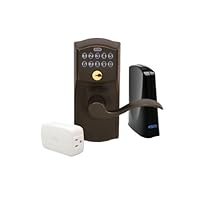
Schlage LiNK Wireless Keypad Entry Lever Lock Starter Kit System, Aged Bronze

Schlage LiNK Wireless Keypad Entry Lever Lock Starter Kit System, Aged Bronze
  • Receive email or text notifications
  • Install and set up the system with ease
  • Remotely monitor access to your home
  • Access your home from anywhere
  • Monthly subscription fee required for remote access

I love this lockset really. I've had it for over a year. When I bought it I too didn't realize that Schlage wanted to sell their internet service. I was very disturbed by this and didn't buy into it. Instead I bought a "Vera" controller from Micasaverde.com to control it. Vera connects to my internet connection and controls ALL my Z-wave based systems (this Schlage lock included) with NO SERVICE CHARGE! You buy/install the Vera system, mate it with the lock (don't need Schlage's internet controller) and off you go. You can lock/unlock remotely. You can change access codes remotely. You can get notifications of the lock being accessed, door opened, etc.. I entered 6 codes to cover my family needs, friends and a variety of service people.

I am buying another lock for another property and already have another Vera (which also controls lights, thermostats, IP cameras, etc.).

If you want this lock and want a great way to get into DYI home automation buy it and pair it with Vera.

By the way I am not affiliated with Schlage or Micasaverde.com in any way.

I'd rate the lock 5 star except I disliked the Schlage marketing/non-marketing of their service and pairing it with other Z wave controllers does take time.

Buy Schlage LiNK Wireless Keypad Entry Lever Lock Starter Kit System, Aged Bronze Now

I was very happy about the arrival of my Schlage LiNK door lock. It was easy to install, taking only about a half hour to replace an existing lock on my front door. It is also easy to use once setup. The setup process is a little complicated, requiring carrying the wireless connector to within a few feet of each device to be included in each individual's home system and pushing several buttons in a timed period. There are no included combination programming instructions included although the instructions state that such programming is possible. After the more than $300 dollar purchase, to find that the entire wireless operation won't work unless you subscribe to the $12.99 per month web service was very upsetting, especially since I only have one lock. The same lock, without the wireless capability can be had for about half the price. If I had to do it again, Although I love the lock, I would not have purchased it had I known the service was required and cost so much.

Read Best Reviews of Schlage LiNK Wireless Keypad Entry Lever Lock Starter Kit System, Aged Bronze Here

I love this lock. I haven't signed up for the wireless access yet (it's $13/mo) but program it manually. You can easily change the master program code to something you can remember.

One noteIf you have a standard door with 2 holes already drilled (say a handle lock & a deadbolt) this all in one lock probably won't cover both holes and you'll need to get a metal cover plate or use the Schlage deadbolt version which doesn't lock automatically behind you. So make sure to read the measurements carefully if you're putting it into an existing lock hole.

Want Schlage LiNK Wireless Keypad Entry Lever Lock Starter Kit System, Aged Bronze Discount?

I should have read the reviews before I bought this item.

The first thing to mention is the cost of the "service". I bought these, then realized that I had to pay an annual fee to use the Schlage service. I decided not to use the Schlage service, and, to buy the z-wave bridges from micasa instead. I purchased a vera 3, which does not require an annual service charge. So, I do not recommend the Schlage "bridge" that is included in this package. It is simply not worth it. The bundle is not worth it, because of the extra cost to buy the Schlage "bridge". Then, there's the cost of the service. It is not worth it. I purchased the vera 3 to control the locks, and it (the vera 3) works just fine.

The locks are a different matter. One of the three locks was dead out of the box. Unfortunately, I did not realize this until the lock was already installed on the door. Luckily, I was only on my second lock installation, so, I just installed my third lock and left the broken one for the last install. I was able to sync the two working locks with my vera 3 with very little effort. And, everything worked fine.

About a week after my install, one of the locks stopped working. I ended up changing the batteries, and, this fixed the problem. But, I clearly do not want to have to replace the batteries every week. Not a good sign.

Instead of immediately returning the defective items to Amazon, I tried to contact Schlage for support. BIG MISTAKE! If your lock is defective, and, you still have the opportunity to return it to Amazon DO IT! The Schalge support desk is worthless! These people wanted me to REINSTALL the lock on a door in order to diagnose the issue with the lock! Ridiculous! But, I kept trying to work with the Schlage folks to get the locks fixed (two of the three that I purchased). And, during this process, the return period for Amazon expired. Now, I am stuck with two locks that do not work. And, I am still trying to deal with Schalge support to get the locks replaced.

Let me review:

Bridge is worthless, unless you want to pay a $100+ annual fee

Two of the three locks I purchased malfunctioned with the first 30 days

Schalge customer support is worthless

If I were going to do this again, I would not buy the bundle (this item), I would buy the locks independently. And, at the first sign of trouble (within the Amazon return period), I would return the locks to Amazon as defective. If you end up having to deal with the Schlage customer service good luck!

Save 69% Off

While I understand some of the negative comments out here, I'd like to offer my perspective. I own a condo in another state which I have to rent out in order to make ends meet. Now, I could have the uncertainty of sending keys to my guests, hoping they don't reproduce them while they're staying in the condo, but that was unsettling for me. I needed a way to provide them access during the timeperiod for which they paid, and then deny them access after they checkout. Too, I have a cleaning service come in, inbetween rentals.

This lock is perfect for my needs. I can add/delete user code remotely, from my cell phone or from my PC. If the code doesn't work, I can send a remote unlock. If the cleaning company doesn't work out, I can remove their code without the worry that they'll re-enter after I've fired them. I can remotely turn on the light for times when the condo is sitting empty. And, although I haven't purchased it yet, in the future I will get the thermostat so that I can monitor/adjust it remotely, too.

Its a win-win for me.

True, I have to pay $20 for Internet service plus the $13 for the monthly service, but I am hoping I can recoup some of those fees from guests who want to opt for WiFi while they're renting from me.

Finally, the service will allow me to add other houses. So, for the $13/month (less if you pay annually), I can manage a lock on my permanent residence, too.

It is a solution I likely would not have opted for had I not had the other property, but am glad it was available for my requirements.

iLive IHP610B MINI SYSTEM IPOD/IPHONE DOCK

iLive IHP610B MINI SYSTEM IPOD/IPHONE DOCK
  • Home music system with dock for iPhone/iPod (iPhone/iPod sold separately)
  • Dock to play and charge
  • Plays CD and CD-R/RW discs
  • 10 FM radio presets with digital volume control
  • Full function remote control and AC adaptor included

Got each of my sons an iPod touch for Christmas 2009 and then on their 2010 birthdays got them each one of these systems. It adds an incredible amount of functionality for the money. It amplifies the music so it can be shared with a roomful of people. The sound quality is good, but not great. It even has a video out so that videos can be displayed on a television. It's great for sharing Youtube videos with a roomful of people. My sons like the way it looks. It comes with a remote control to change songs or whatever from across the room. It includes radio and a CD player as well. I thought it was a great value at $100 but it's a spectacular value at the current price of under $80.

Buy iLive IHP610B MINI SYSTEM IPOD/IPHONE DOCK Now

I didn't purchase this system through amazon but I thought I'd leave a comment so people knew what they were looking at. First I would like to describe these speakers. If your looking for Bass in your stereo system then DON"T get these

FAQs:

How loud does it get?

They max volume at 30, but its not that loud. Barely fills my bedroom with sound at max. My TV gets louder.

Does it charge and play any IPod or Iphone?

This is a plus because it DOES play ANY!!!! Ipod or Iphone and charges them. There is also an Aux cable port to play your laptop through the headphone jack if you want.

Is it big?

Compared to other self stereo systems it isn't big. However I have computer speakers that are 5x smaller, that also get louder than these. So in my opinion the size is to big for the lack of volume.

How are its functions?

CD works great no problems, the remote is also great, and all the modes work like they say.

How is the Bass?

For me this was the most important question. So the answer is, the Bass is non-existence!! This causes the sound quality to drop.

So in my opinion just get a smaller system that also charges your Ipod cause this one isn't worth the size and money.

Read Best Reviews of iLive IHP610B MINI SYSTEM IPOD/IPHONE DOCK Here

Here is the lowdown:

PROS:

1. It worked right out of the box with little set-up and the sound is decent, but not great.

2. The ipod dock worked fine. It has attachments for the variety of different docking needs.

3. I was able to buy it a half mile from my house at Meijer. Convenient.

CONS:

1. Speakers are connected and wires are extremely thin. The whole system is cheaply/lightly built. You can feel it isn't going to last too long before problems arise.

2. Speaker wires are pretty short. I couldn't stretch it to the place the last system's speakers were.

THE VERDICT:

The "system" is okay for the spot it is going in (my garage), but I would never recommend it as your go-to system. Go Sony or check out what Best Buy has to offer.

My old radio used to cut out occasionally, the stations didn't come in well and it was also cheaply made, but since I found it in an empty apartment, I couldn't complain. Hopefully, this lasts for a few years.

Want iLive IHP610B MINI SYSTEM IPOD/IPHONE DOCK Discount?

I just got my system today, i couldn't wait for it to arrive! I gotta say this system is loud! this system is good for bed rooms! the bass is good not that great! its worth the buy tho for $75. Love it! i recommend you to buy this product its really worth it!

Save 24% Off

they have these at big lots right now marked down from 79 dollars to only 59 dollars! saw them there last night at transit road williamsville/clearance location. There was about 8 of them on the shelf

Philips AJL750/37 Kitchen Clock Radio with 7-inch TV

Philips AJL750/37 Kitchen Clock Radio with 7-inch TV
  • 7-inch widescreen LCD display with built-in ATSC digital TV tuner for high quality viewing
  • Features under-cabinet mounting for clutter-free kitchen counters; flip-down display panel saves counter space
  • MP3 Link with stand for portable music playback
  • Magnetic remote control for convenient mounting onto fridge
  • Includes built-in cooking timer and clock for your convenience

I purchased this item and returned it the next day. The television and radio worked as expected. HOWEVER, the television did not pick up/program the cable stations. Out of about 150 cable programs, it only accepted 17 channels. I called Philips and they said it was designed for people who want to use an antenna. If you use an antenna and do not want to hook up to cable, I feel the set wourld work fine. Do not buy it if you expect to get all your cable chanels on the set.

Buy Philips AJL750/37 Kitchen Clock Radio with 7-inch TV Now

This is just what we needed in our Kitchen. It barely fits under our counter, but it works very nicely. I plugged it in hooked up my cable tv cable, and set the unit up with out any problem. Picture quality is just fine though I have no HD source hooked up to it. Didn't really get this tv for HD viewing. Found all my basic cable channels fine with out any additional tuner. Probably the best television speakers in my house. The audio quality isn't high end, but the sound is pretty rich for such a small unit. Be warned though if your cabinets aren't any deeper than 12 in. it will be a tight fit, and the unit will stick out a little from the front of your cabinet. It would fit much better under a 14 to 16 in cabinet. Mine are 12 in and the unit sticks out about an in., and getting the cable hooked up required me taking the unit back down. It's a tight fit.

Read Best Reviews of Philips AJL750/37 Kitchen Clock Radio with 7-inch TV Here

My wife has wanted an TV for the kitchen for some time. I was fortunate to find this unit on sale (Gold Box) and got it for Christmas. She could not be more pleased. The picture quality is great and the sound is surprisingly good. At times she simply listens to the radio and I am really surprised at how clear and loud this little unit can be. I would purchase it again even if it weren't on sale.

Want Philips AJL750/37 Kitchen Clock Radio with 7-inch TV Discount?

I got the radio on the deal of the day but the tv doesnt work withcable or anttena, im very unsatisfied, the radio works ok the timer too, it looks good but the tv doesnt work with directv or cable so ill return it.

Save 23% Off

I had previously purchased a Phillips 7" TV and loved it. After about 5 years it broke so I replaced it with this version. Not only does this one not have a DVD player or AM radio but it is not compatible with cable television. I called up Phillips directly and they said the TV can only be used with an antenna. What a joke! I returned it the next day.

Apple iPod nano 8 GB Pink (6th Generation) OLD MODEL

Apple iPod nano 8 GB Pink OLD MODEL
  • 8 GB capacity for about 2,000 songs
  • Up to 24 hours of audio playback on a single charge
  • 1.54-inch (diagonal) color TFT display with 240-by-240-pixel resolution (220 pixels per inch)
  • Support for AAC, Protected AAC (iTunes Store), MP3, MP3 VBR, Audible, Apple Lossless, AIFF, and WAV audio formats
  • One-year limited warranty

I, JenNA, bought the 6th generation Nano when my 3rd generation got stolen. I absolutely hated the new one. I am pretty open to technological change but in my opinion this one was not just a step backwards but might as well have been run in the opposite direction. It was pain to play music because after a short ways into the song the screen would fade out so you could not just click a button to change songs but rather had to turn it back on and go through the whole process of finding that song to change it. It also lost the TV show and movie features. I was just absolutely disappointed with the Nano and quickly bought another one.

Buy Apple iPod nano 8 GB Pink (6th Generation) OLD MODEL Now

I have owned many iPods in the past (different generations of nanos, shuffles, iPod Touches and the basic iPods). I generally use my nano in the car to listen to music. My last nano was stolen so I was grateful to receive a new one as a recent birthday present.

This nano is very difficult to use. The touch screen is really hard to use if you have fingernails. The screen is so little and it doesn't give enough room for your finger to select the small icons. And half the time even when I am able to select anything it doesn't recognize my selection.

If you want to pause the music in the middle of listening or switch to the next song that's even more difficult. You have to 'wake up' the screen to get the pause or switch buttons to show but it is really hard to get it to wake up. Then if you don't make your selection immediately the pause and switch options go away. Nothing about navigating this iPod is easy or user friendly. I'm sure the idea of giving nanos touchscreens sounded good on paper, but they shouldn't have reduced the size of a nano down to a shuffle at the same time!

This is my first apple product I am unhappy with. If I could I would return it because it's definitely not worth the almost $150! This nano is probably fine for teenagers who will navigate it smoothly after a few uses but I wouldn't recommend it to anyone else.

I expect apple to change the design and retire this one quickly.

Read Best Reviews of Apple iPod nano 8 GB Pink (6th Generation) OLD MODEL Here

Got this thing for my wife for her birthday and it completely died the 2nd day she had it. The Apple store would not exchange it for a new one but they would let me make an appointment to come back and have someone look at it to tell me what I already knew it wouldn't turn on. They still would not give us a new one but would offer us a refurbished one..... when they got one in stock.....??? So they told us they would call us when 1 came in so we could come back a third time to get a refurb (one that has already been defective and hopefully repaired) for a unit that died on day 2.

Btw, read the news, you'll see Apple is now the #1 most valuable company in the world. Now that they are the big dog instead of the underdog, I'm sure they can get away with this kind of attitude and people will still buy their pretty, overpriced junk.

Thumbs up to Amazon though, they always do their customers right when it comes to returns!

Want Apple iPod nano 8 GB Pink (6th Generation) OLD MODEL Discount?

Received my Apple ipod nano 8 GB 6th Generation newest model very excited to down load my music on it. Turned it on to find out that after a few minutes the music would stop. The icons would also start shaking. I sent that one back to get a replacement. I received the replacement in about 5 days. I down loaded my music charged it over night. When I turned the nane on it was even worse. It stoped playing right away and you could not move the icons. Not a happy camper with this item...

Sorry, but this is not the reliable iPod that I was expecting. Maybe it is the design, but it skips around from song to song, sometimes, shuts off. My first one ended up with a dead screen, and Apple gave me a new one, but same (or maybe more) problems. I love the price, and the compact size. But, if it is made for motion (I use mine for around the house when cleaning and on the elliptical), then it needs to be reliable. Nice try Apple, but back to the drawing board.

Humvee Self-Powered Dynamo Wind-Up AM/FM Radio with Alarm Clock & Compass

Humvee Self-Powered Dynamo Wind-Up AM/FM Radio with Alarm Clock & Compass
  • Digital Alarm Clock AM/FM Radio
  • Dependable Emergency Light.
  • Self-Powered Dynamo Wind-Up. Retractable Handle.
  • Compass. Flashlight.
  • 6V DC Plug.

This is a great little gadget with such big functions. I would recommend this to anyone who cares about taking care of themselves and their families in times of emergency type situations. The alarm is very loud, the radio works great and the light and compass...well, you never know when you may need them. Small enough to pack and the hand crank makes it a life saver if your batteries become a no/go. I'm telling all of my friends about this little guy. You never know when you will be hit with an emergency that leaves you in the dark without communications.

Georgene, TX

Buy Humvee Self-Powered Dynamo Wind-Up AM/FM Radio with Alarm Clock & Compass Now

After just one week the radio just stopped working all of a sudden even though the flashlight, clock and emergency siren continued to work. So I shipped it back for a refund a week ago and I'm still waiting to be refunded for the purchase price. Will update my review for better or worse when I receive the refund or not.